Discuss a trialarrow_outwardDiscover Creoarrow_outward
Creo Library
Creo Library. Find the tool for the task.
Explore specialist Creo capabilities through practical descriptions, source imagery and technical reading. Start with the work you need to do, then check the extension and environment that support it.
Find your next capability. Put Creo’s tools to work.
Creo can support work beyond core part and assembly design. This library groups selected manufacturing, definition, analysis and calculation tools around their engineering purpose, with the source resources beside the relevant topic.
Understand the task
Identify the output you need: tooling, a toolpath, a tolerance decision, a study or a calculation-driven parameter.
Inspect the reference
Use the screenshot and technical document to frame questions about preparation, inputs, outputs and supported scope.
Confirm the environment
Check current availability and compatibility with TriStar before specifying the tool for a team.
Use the descriptions to shortlist a workflow, not to assume entitlement. Bring a representative model and a specific task to the discussion, then confirm the package, extension, release and equipment requirements.
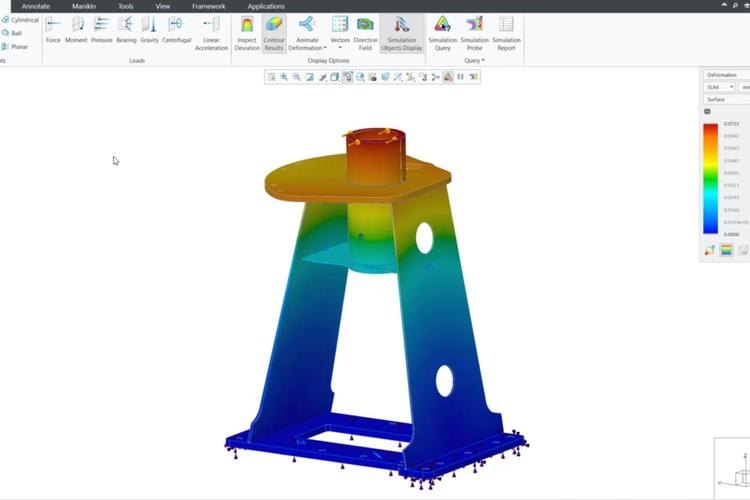
The product screenshots below come from PTC’s extensions reference. They illustrate the tools; current interface appearance and scope may differ by release.
From model to production preparation
From design to production. Explore Creo manufacturing tools.
Tooling design, NC programming and additive preparation address different production questions. Start with the process, material and required deliverable so the extension discussion stays connected to the work.
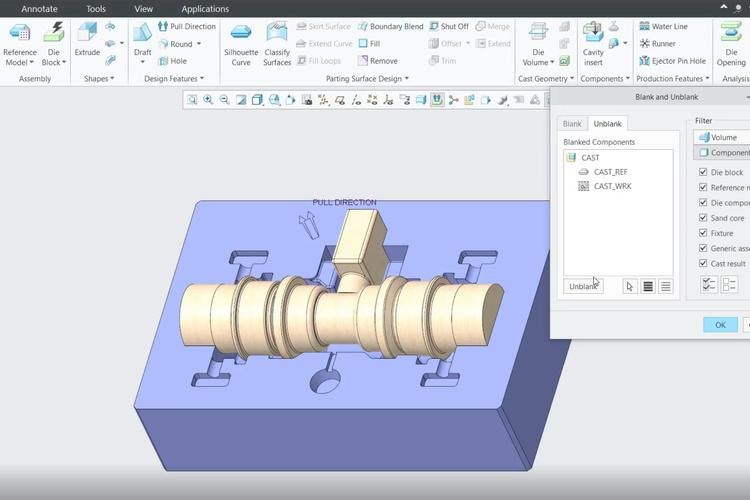
Tool Design Extension
Develop mold and casting tooling around the Creo model, including parting geometry and core/cavity work. Review the tooling definition and its relationship to the design before preparing downstream deliverables.
Frame your evaluation+
Bring a representative molded or cast component and explain the tooling handoff your team needs.
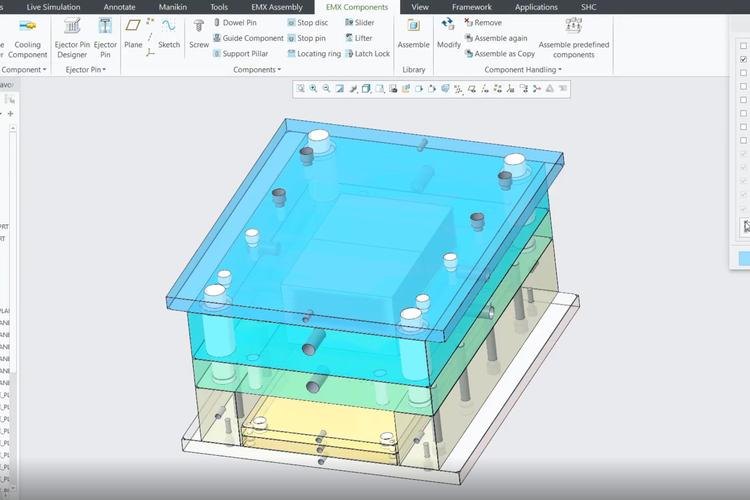
Build a moldbase workflow around component libraries and process-driven tooling preparation. Identify the intended mold standard, supplier components and manufacturing information before evaluating automation.
Frame your evaluation+
Which moldbase elements should come from an approved library, and who maintains that library?
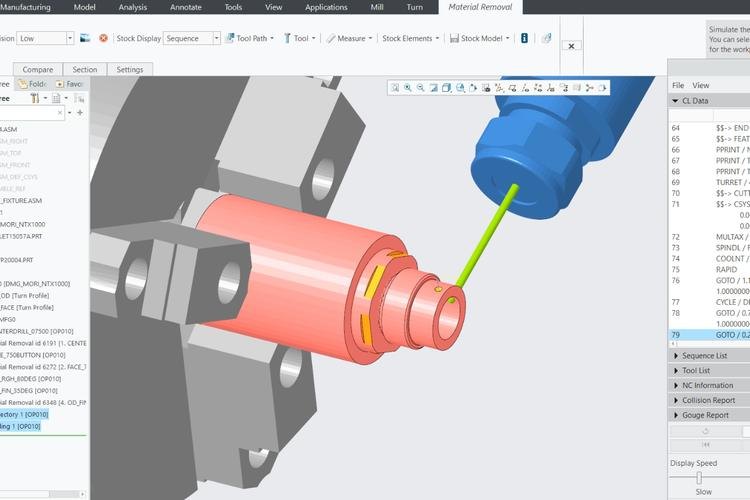
Plan integrated NC programming for supported milling, turning and wire EDM work. Keep the machine, postprocessor, stock and process verification in the evaluation rather than treating a toolpath as a finished production instruction.
Frame your evaluation+
Use a representative part and machine configuration to review programming and verification together.
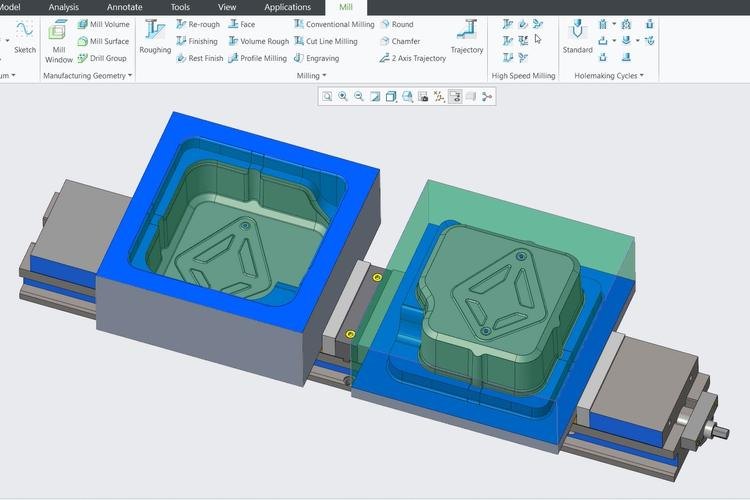
Explore specialist three-axis roughing and finishing strategies for molds, dies and other surface-intensive work. Compare machining intent, retained stock and the expected surface requirements on a practical example.
Frame your evaluation+
Which geometry or finishing requirement makes the current programming approach difficult?
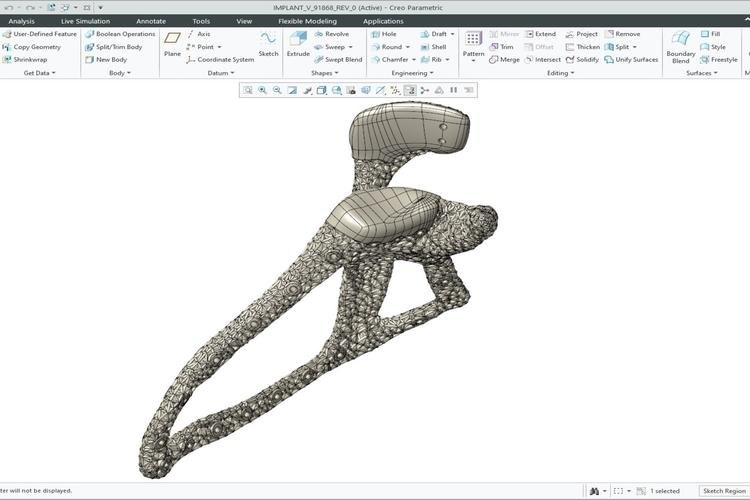
Investigate lattice design and print preparation within the CAD workflow. Agree the manufacturing process and material constraints, then review the model, build orientation and supported printer connection.
Frame your evaluation+
What would make a useful lattice or print-preparation example for the intended process?
Associative CAD/CAM work still requires the relevant machine, postprocessor and manufacturing review. Confirm supported processes and extension scope for the selected release.
Communicate the engineering definition
Make design intent clear. Build the model-based definition.
Dimensional analysis and annotation authoring serve related but distinct purposes. One examines variation in a functional stack; another helps communicate the product definition. Decide which question you need to resolve before choosing the extension.
EZ Tolerance Analysis Extension
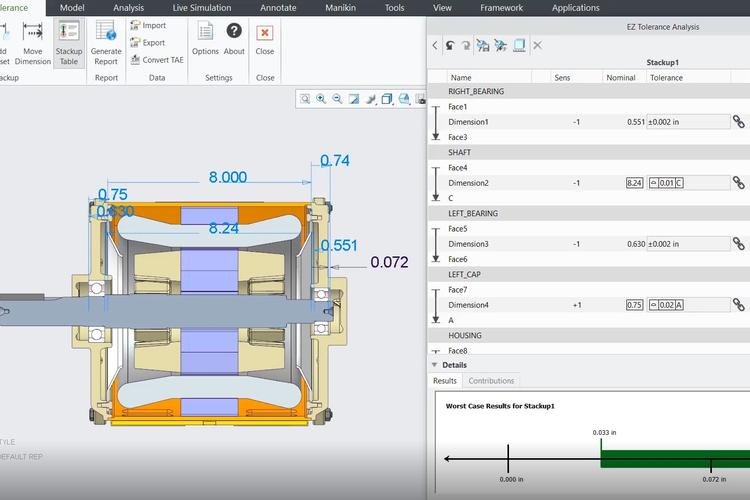
Investigate one-dimensional worst-case and statistical tolerance stacks around an assembly. Define the functional measurement, the dimensional contributors and the assumptions behind the analysis.
GD&T Advisor Extension
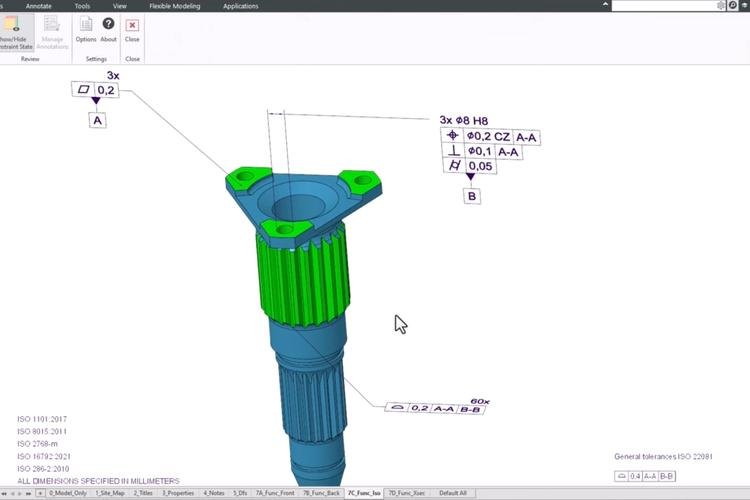
Use guided annotation workflows to develop geometric dimensioning and tolerancing on the model. The responsible engineer still needs to establish the functional intent, applicable standard and review criteria.
GD&T Advisor Advanced Extension
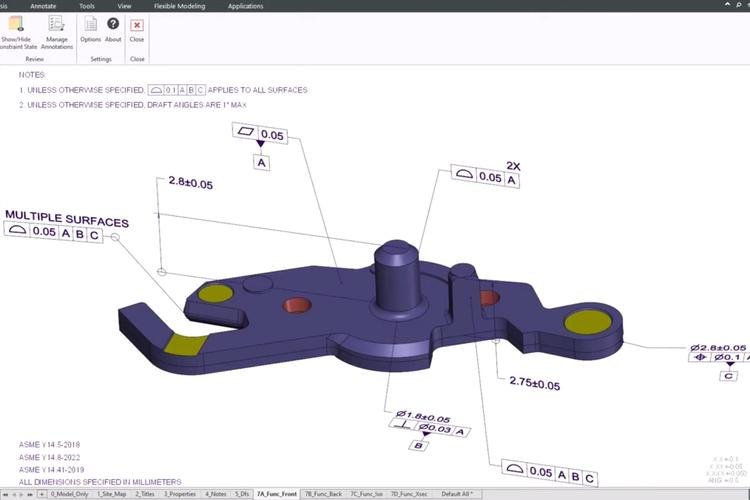
Consider the Advanced workflow for assembly annotation and the review of existing model annotations. Confirm the applicable release and scope before planning how legacy definition will be reused.
Guidance and automated checks support authoring; they do not replace engineering responsibility for the definition or guarantee compliance in every application.
Investigate the behavior. Choose the right simulation tools.
Motion, fluid flow, mold filling and interactive design feedback ask different questions of a model. Compare the method and inputs your task needs before comparing tool names.
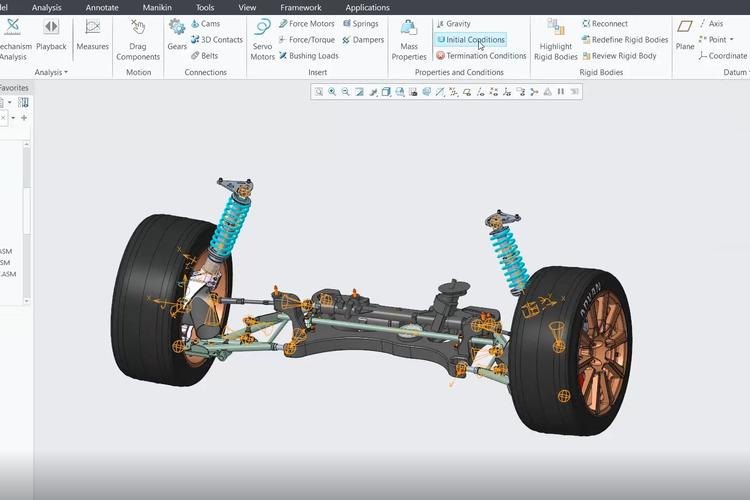
Mechanism Dynamics Option Extension
Study mechanism motion and loads using a defined assembly and operating scenario. Describe joints, motion drivers, forces and the quantities the team needs to investigate.
Which part of the movement or load transfer should the study help explain?
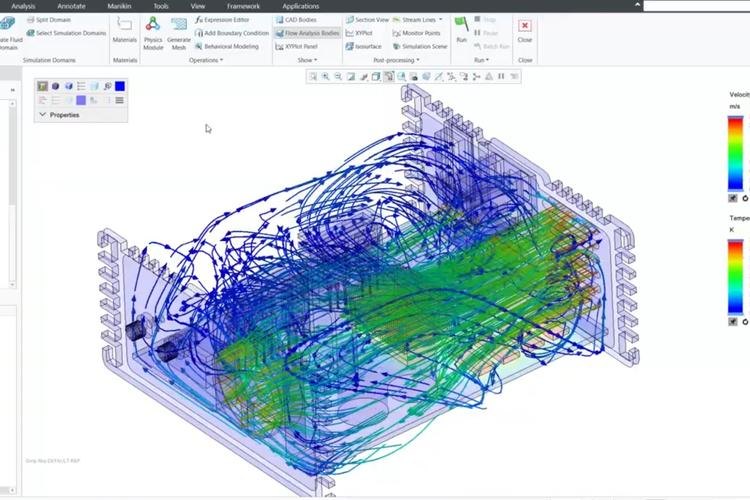
Investigate fluid-flow and heat-transfer questions in a CFD workflow. Define the flow domain, fluid properties and boundary conditions, then plan the numerical and engineering review.
Which inlet, outlet or thermal condition represents the intended operating scenario?
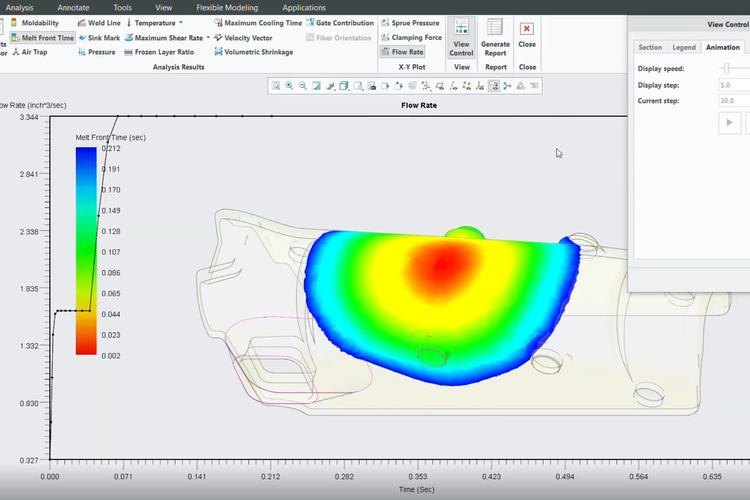
Explore mold-filling behavior around a representative part, material and process setup. Identify the molding question and the evidence needed before changing the part or tooling.
Which filling concern should the study investigate before the next tooling decision?
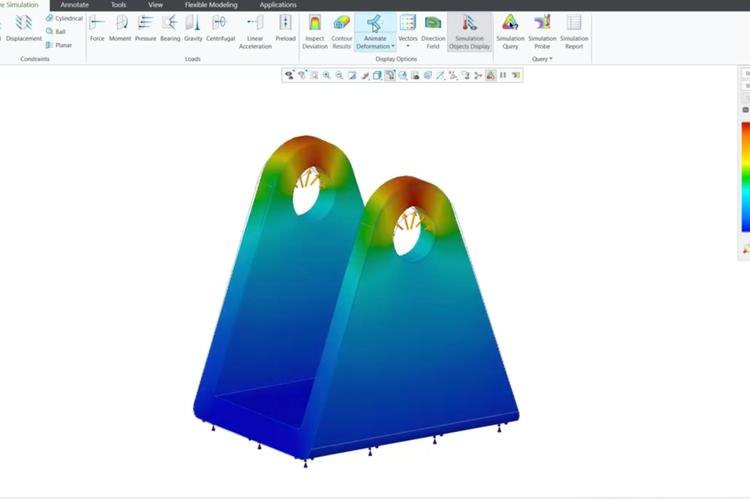
Use interactive simulation guidance while exploring a design. Keep the chosen study type and assumptions clear when comparing the response to a geometry change.
Which early design alternative would benefit from immediate engineering feedback?
Review the Advanced offering when the interactive workflow requires additional supported physics, including fluid-flow capabilities. Confirm the exact study, hardware and entitlement requirements.
Which additional physics makes the Advanced offering relevant to your task?
Interactive feedback, CFD, mechanism analysis and detailed Ansys-powered studies are different workflows. Confirm the supported physics, method and review process for the product being evaluated.
Connect the calculation. Keep the design reasoning close.
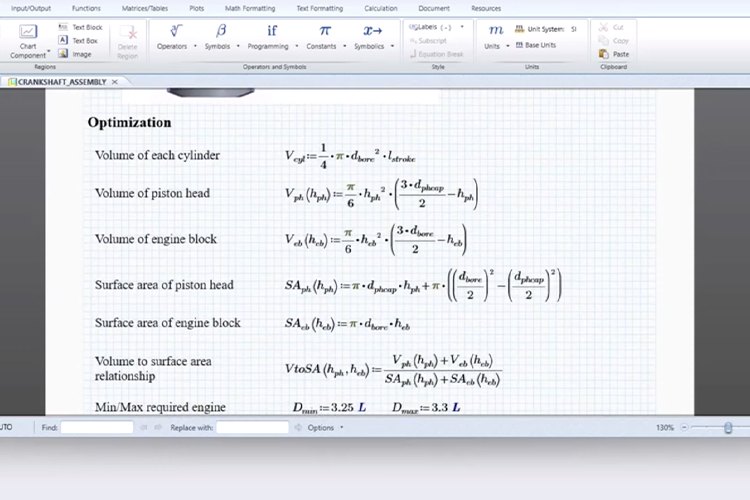
Source Engineering Notebook example. Equations shown are part of the source image, not a calculation performed by this page.
Engineering Notebook
Engineering Notebook connects calculation worksheets with the model’s parameters. Use it to make an engineering relationship explicit, with an agreed direction for inputs and returned results.
Start with one design relationship the team can explain. Identify the model parameters used by the worksheet, the calculation assumptions and the output allowed to influence geometry. Review the result and regeneration behavior before reusing the workflow.
Record the parameters, units and assumptions used by the calculation.
Review the worksheet
Keep the equation, method and supporting rationale understandable to another engineer.
Control the return
Agree which result may update the design and how that change is checked.
Confirm the supported Creo/Mathcad versions, integration and licensing for the proposed environment. A linked worksheet still needs an appropriate engineering method and review.
See how a calculation worksheet connects with Creo model parameters.
Different industries. Purpose-built engineering workflows.
Use these illustrative applications to choose the model, reference and engineering question for a useful evaluation.
Scroll or swipe to explore all 5 industries. Use Tab to reach each industry link.
Aerospace & Defense
Frame a definition or study task around a representative component and the program’s review responsibilities. Use the technical resources to clarify scope without implying a certification outcome. Library in practice What evidence and definition must accompany the selected workflow?
Vehicle programs coordinate components across packaging, supplier and manufacturing constraints. Use this setting as a practical example when selecting specialist design, manufacturing and analysis capabilities. Which product interface and review criteria should guide the evaluation?
Use a fixture, tooling assembly or equipment mechanism to identify the next specialist task. Keep the intended manufacturing or analysis output connected to the people who will use it. Library in practice Which engineering handoff needs a more suitable tool or reference?
Consider an enclosure, cooling or precision-interface question. Identify whether the next useful step is a tolerance review, a flow study or a calculation connected to the model. Library in practice Which product question should guide the extension selection?
Device teams work within defined design controls and documented review responsibilities. Use this setting as a practical example when selecting specialist design, manufacturing and analysis capabilities. Which product interface and review criteria should guide the evaluation?
Before you choose an extension. Your library questions, answered.
Clarify the tool, scope and surrounding workflow before choosing an extension.
Is every extension included in a Creo package?+
No. This library describes selected tools and source references, not a universal entitlement. Confirm the package, extension, release and licensing for the users and workflow being proposed.
How does this library differ from Creo Capabilities?+
The capabilities guide provides a broader view of design work across Creo. This library focuses on selected specialist extensions, their engineering purpose and the relevant technical reading.
Are the screenshots a current software specification?+
They are official source-page images used to illustrate the relevant tool. Interface appearance and capabilities can vary by release. Use the current proposal and documentation when specifying an environment.
Where should we begin when several tools seem relevant?+
Choose one representative task and the output needed by the next person. Bring the model, assumptions and review criteria to the discussion, then compare the method and supported scope.
Does a technical datasheet replace a workflow evaluation?+
No. A document helps establish scope, but a useful evaluation also checks representative data, hardware, integrations and the engineering process around the tool.
Can we use these tools without manufacturing or analysis review?+
The tools support engineering work; the responsible team still needs to review the setup, results and deliverables. Plan the appropriate verification for the production or design decision.
Your specialist Creo discussion
Turn your shortlist into a plan. Build your Creo toolset.
Tell us what needs to be designed, analyzed, defined or prepared for production. TriStar can help shortlist the relevant extensions and plan an evaluation around your engineering environment.