
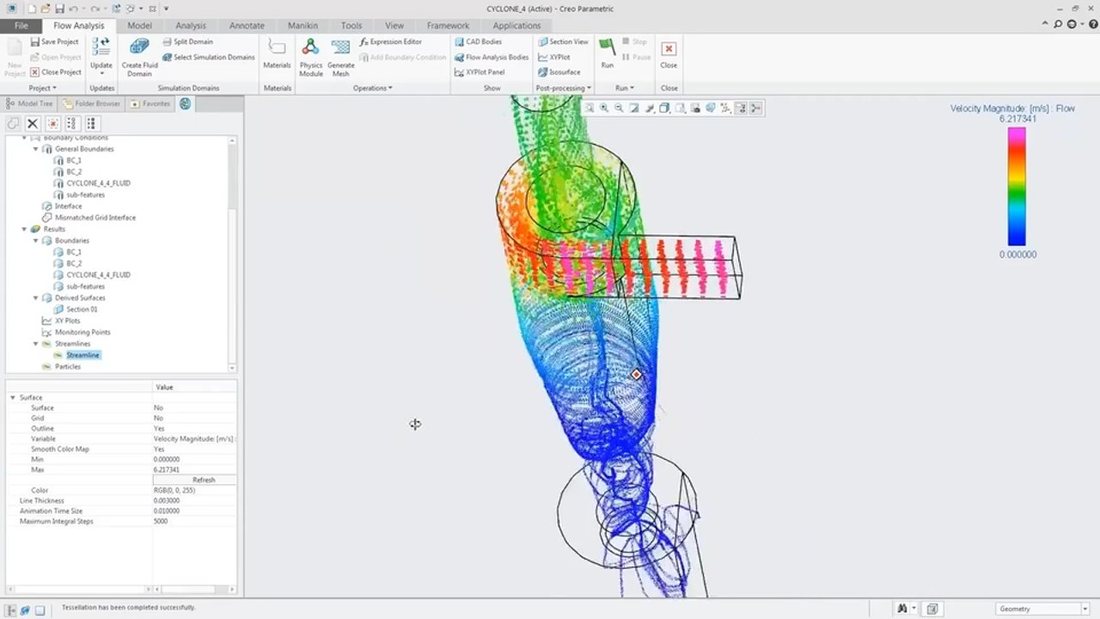
Shorten the investigation
Prepare the domain and mesh close to the design model. CAD associativity and multicore processing can reduce repeated preparation as geometry develops.

Bring fluid behavior into the design conversation. Explore flow and heat transfer within Creo, investigate a proposed change and keep the assumptions behind the result in view.
Creo Flow Analysis is a computational fluid dynamics extension for investigating liquids, gases and heat transfer around or inside a product. It connects the fluid study to Creo geometry, so engineers can examine a question in the environment used to develop the model.
A useful study starts with a physical situation—not just a colored plot. Define the fluid region, material properties, inlet and outlet conditions and thermal environment. Automatic domain preparation and meshing help build the numerical model; the engineer still judges whether its setup and results represent the question.
PTC’s product overview introduces the CFD workflow. Published December 2023; confirm current release and entitlement for your environment.
Use CFD to make a design change more deliberate. Its practical value comes from connecting an observation to a decision the team needs to make.
Prepare the domain and mesh close to the design model. CAD associativity and multicore processing can reduce repeated preparation as geometry develops.
Examine pressure, velocity and temperature to investigate a passage or component. Select additional physics when the operating question requires it.
Test a revised passage, vent or component arrangement against a baseline. Keep conditions consistent and record the tradeoffs before selecting a direction.
Simulation can guide a design decision and help target physical testing. It does not guarantee an improvement without a suitable model and engineering review.
Start with the physics you need to represent. Additional capabilities expand the study scope; every tier still needs appropriate setup and review.
| Study capability | Basic Flow, thermal and turbulence studies. | Advanced Additional transport and moving-component effects. | Premium Additional multiphase and dynamic behavior. |
|---|---|---|---|
| Shared foundation | |||
| Internal and external flow | Included | Included | Included |
| Flow-result animation | Included | Included | Included |
| Parallel processing | Included | Included | Included |
| Flow, heat transfer and turbulence | Included | Included | Included |
| Added transport and motion | |||
| Individual particles | Not listed in this tier | Included | Included |
| Radiation heat transfer | Not listed in this tier | Included | Included |
| Species mixing | Not listed in this tier | Included | Included |
| Moving / sliding meshing | Not listed in this tier | Included | Included |
| Additional physical behavior | |||
| Cavitation | Not listed in this tier | Not listed in this tier | Included |
| Multiphase | Not listed in this tier | Not listed in this tier | Included |
| Multicomponent mixing | Not listed in this tier | Not listed in this tier | Included |
| Fluid–solid dynamics | Not listed in this tier | Not listed in this tier | Included |
Based on PTC’s two-page Flow Analysis datasheet (2022). Confirm current release, platform, supported physics and license scope for the proposed environment. Animating calculated flow results is different from the interactive design guidance in Creo Simulation Live.
Review the official capability matrix, CAD associativity and study preparation. Published reference: 2022.
Download product datasheetChoose a representative task and involve the people who will use its evidence. Designers and specialists can work from the same product geometry while bringing different responsibilities to the study.

Investigate how a passage, vent or enclosure change influences flow distribution or cooling. Narrow the alternatives worth developing and seek specialist support for unfamiliar behavior.
Connect the study to pressure, temperature and performance requirements. Define realistic operating cases and compare the proposed improvement against its baseline.
Review the numerical approach, mesh behavior, convergence and required physics. Explain where the model is useful and where further verification is needed.
Place a flow study within the wider design and analysis workflow.
These illustrative applications connect a product question with operating conditions and an appropriate engineering review.
Scroll or swipe to explore all 5 industries. Use Tab to reach each industry link.

Frame a duct or thermal-management study around documented operating conditions. Preserve configuration, numerical method and review evidence; this example implies no certification outcome. Fluid studies in practice What operating envelope must the study represent?

Vehicle programs coordinate components across packaging, supplier and manufacturing constraints. Use this setting as a practical example when reviewing fluid movement and thermal behavior in a product design. Which product interface and review criteria should guide the evaluation?

Investigate a pump passage, valve body or cooling circuit. Compare geometry at a defined operating point and examine where losses or uneven distribution could influence performance. Fluid studies in practice Which flow path deserves a closer look?

Explore airflow and heat transfer around equipment. Review heat inputs, ventilation assumptions and the operating environment before using a temperature field to support a decision. Fluid studies in practice How could vent placement affect cooling?

Device teams work within defined design controls and documented review responsibilities. Use this setting as a practical example when reviewing fluid movement and thermal behavior in a product design. Which product interface and review criteria should guide the evaluation?
Prepare the scope, people and evidence for a useful evaluation.
No. It is an extension that brings a CFD workflow into Creo. Confirm the required release, extension entitlement and workstation requirements for the proposed installation.
Begin with the physical effects that matter to the engineering question. Use the matrix and datasheet to frame the discussion, then verify current supported capabilities and licensing.
No. Domain choices, boundary conditions, numerical behavior and interpretation still need an appropriate engineering review. Plan mesh sensitivity and other verification around the decision.
No. CFA can animate calculated flow results. Interactive directional guidance during design is a distinct workflow associated with Creo Simulation Live; do not assume identical behavior or licensing.
Bring a representative model, fluid and thermal properties, operating conditions, the suspected issue and the decision you need to make. Include the person who will review the analysis.
It can help focus experiments and compare alternatives, but a model depends on its assumptions and numerical setup. Determine the physical evidence and engineering approval appropriate to the product.
Tell us what moves through the product, the operating conditions and the decision you need to make.
TriStar can help scope a representative demonstration and clarify the required Creo environment.