
Prototype decisions
Investigate an uncertainty before committing to another physical build. Model-based studies can inform the test plan while physical validation remains part of the engineering process.

Take on larger assemblies, deeper analysis and more demanding deliverables with a CAD environment that can develop with your team. Plan the tools and working practices around the product you want to build next.
Explore the growth planGrowth exposes the cost of decisions arriving too late: another prototype, a revised production input or a specialist waiting for usable geometry. Creo brings design, analysis and manufacturing preparation around the product model. Assess the opportunity against a recurring project bottleneck rather than the number of features available.
Investigate an uncertainty before committing to another physical build. Model-based studies can inform the test plan while physical validation remains part of the engineering process.
Keep a model change connected to its dependent engineering work. A revised mounting location, for example, may affect the assembly and production definition as well as the part.
Give the receiving team enough context to continue the work. Judge improvement against your own project baseline, rather than assuming a universal time saving.
A larger organization needs a platform that supports clear ownership and repeatable practice. Use these selection lenses to assess organizational fit; the next section covers the engineering capabilities themselves.
Common modeling and documentation conventions matter when work moves beyond the original author. A peer should be able to distinguish intended design relationships from project-specific choices.
Plan specialist ownership, training and access together. A named specialist may need deeper tools while other contributors need the design and review access appropriate to their work.
Validate the intended workstation with representative assemblies, including opening, changing and reviewing them. Demonstration geometry alone cannot establish suitability for your product complexity.
Decide which uncertainties require specialist investigation and who accepts the evidence. This establishes the review responsibility before selecting a simulation or design-exploration method.
Include the recipient in an exchange test. Internal teams, suppliers and manufacturing can need different information; supported formats and a successful export do not by themselves establish a useful handoff.
Keep the original purpose and assumptions with reused work. This lets the next designer separate reusable intent from constraints that belonged only to the earlier project.
Explore the engineering work that can grow around the CAD foundation. Open each brief for its technical assumptions and evidence needs. Required capabilities depend on the selected release, package and extensions.
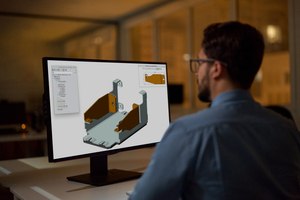
Create parts, assemblies, sheet-metal designs and associated documentation in a parametric environment. A bracket change, for example, can be assessed in the assembly where its mounting interfaces matter.
A well-structured model makes references and intended changes understandable. Evaluate everyday edits and deliverables with a project that represents your team’s product complexity.
Working brief: Bring one assembly, a design change and its drawing.
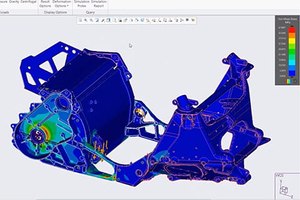
Assess structural, thermal, modal or fluid behavior with the appropriate analysis tools. Use a study to investigate a specific uncertainty, such as a loaded support or a component exposed to heat.
Choose the solver and study depth around loads, materials, boundary conditions and review requirements. Design-time feedback and detailed verification are different responsibilities; define where each belongs.
Working brief: Bring the decision, assumptions and validation method.
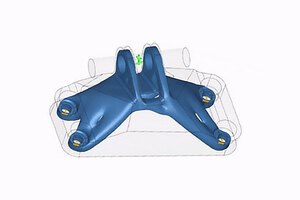
Investigate alternative geometry against defined constraints and engineering objectives. This can help a team investigate design directions it might not otherwise model individually.
Translate the design space, interfaces, materials and manufacturing constraints into a useful study. Generated candidates still need engineering review. Availability and cloud-based services depend on the selected offering.
Working brief: Bring the design envelope and criteria for a useful candidate.

Develop manufacturing preparation around the product geometry, from additive work to CNC machining. Keep the link between design intent and the information the production specialist must inspect.
Assess lattice or support preparation and machining capabilities against the intended process. Confirm extensions, machine requirements and output validation; a prepared digital model is one part of production readiness.
Working brief: Bring the process, equipment and output checks.
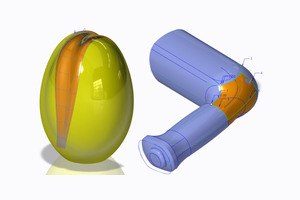
Develop complex shapes where appearance, interfaces and geometric quality matter. This is useful when a design must satisfy both a visual brief and defined physical interfaces.
Inspect the surface behavior and transitions needed for the application. Agree how styling intent, engineering constraints and manufacturing requirements will be reviewed together.
Working brief: Bring the critical surface and the criteria used to judge it.
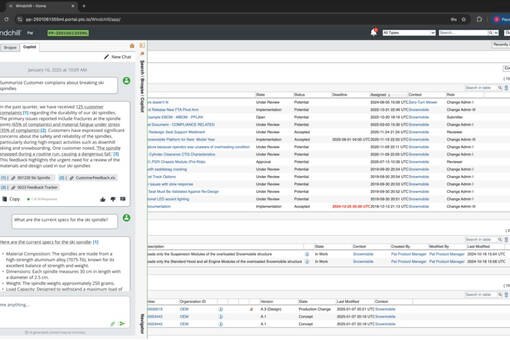
Connect CAD work with controlled product information through an appropriately scoped Windchill environment. This becomes important when several people need an agreed version of the same product information.
Agree revision ownership, access and release practices across the people sharing the product. Product data management is a distinct deployment and process discussion, not an automatic consequence of installing CAD.
Working brief: Bring the revision process and the people who approve changes.
Scope the tools around product complexity and shared engineering work.
When onboarding, distributed collaboration or release administration becomes a growth constraint, include Creo+ in the delivery comparison. This section identifies the organizational triggers; the Creo+ guide explains the services in detail.


Keep the engineering requirements fixed while comparing delivery models. Use the same model and deliverables so a change in service arrangement does not obscure a capability gap.
Identify the contributors who need a shared design session and the interface they must resolve together. Include external participants only within the supported access and collaboration workflow.
Name the owners of onboarding, updates and product information. SaaS CAD administration and enterprise PLM remain separate scope decisions; confirm service boundaries and integration requirements.
Leave the comparison with named responsibilities for service delivery, internal administration and product-data control.
What should become easier to administer as your team grows?
Explore Creo+ services and administrationChoose an evaluation around your product’s constraints and the acceptance criteria of the downstream team. These scenarios identify growth-related review questions rather than preconfigured industry packages.
Scroll or swipe to explore all 5 industries. Use Tab to reach each industry link.

Aerospace teams balance packaging, interfaces and traceable design reviews. Use this setting as a practical example when scaling CAD workflows, specialist capabilities and design collaboration. Which product interface and review criteria should guide the evaluation?

Vehicle programs coordinate components across packaging, supplier and manufacturing constraints. Use this setting as a practical example when scaling CAD workflows, specialist capabilities and design collaboration. Which product interface and review criteria should guide the evaluation?

A growing machine platform brings more assemblies, options and downstream operations into play. Evaluate how a shared model supports design review and manufacturing preparation. Include a production engineer to check whether the model communicates the interfaces and changes needed for the next operation. PLATFORM COMPLEXITY Which assembly changes create the most downstream work?

Product packaging must accommodate supplied electronics, interfaces and changing physical constraints. Assess geometry exchange and review responsibilities as mechanical and electrical contributors increase. Use a representative enclosure or component interface to expose the information each discipline needs from the other. DISCIPLINE INTERFACES Who confirms that updated electronics still fit the mechanical design?

A larger device program needs understandable design inputs, reviewed outputs and controlled change. Evaluate CAD capability alongside the organization’s quality and documentation processes. Bring a design reviewer into the evaluation to agree what evidence must accompany a model change. REVIEW OWNERSHIP Which design outputs require a documented review in your process?
Clarify capability, delivery and team responsibilities before committing to an environment.
The discussion expands from individual modeling needs to shared assemblies, specialist responsibilities, review and data ownership. Start with a representative product and the handoffs that become harder as more people contribute.
Not necessarily. Identify the work each role authors and reviews, then confirm package contents, extensions and access. Plan training and specialist ownership alongside the commercial scope.
Assess supported formats, source versions and the information retained in the intended exchange. Test representative files with the receiving workflow before setting a general import or editing expectation.
CAD capability and product data management are separate planning topics. Confirm the proposed products, integrations, deployment, roles and entitlements with TriStar for your environment.
Begin with the same engineering requirements, then compare delivery, collaboration and administration needs. Confirm supported workflows, release scope and data responsibilities rather than treating SaaS as a different set of design goals.
The recording shown here is the official Creo 13 enhancements video. It is related release content used to start a capability discussion, rather than a growing-teams customer story or a promise of package inclusion.
Tell us what is changing in your product, team and delivery requirements.
TriStar can help scope the CAD tools, working practices and evaluation for your next stage.