
The platform
What stays common?
Identify what both motorcycles share before comparing their differences.

Develop a product family around shared architecture and interchangeable modules. Bring a chosen configuration into 3D, then review the product it actually creates.
Creo Options Modeler helps engineers develop configurable product structures around reusable parts and modules. Instead of treating every variant as an unrelated assembly, define a shared platform and the alternatives that can belong to it.
Use the motorcycle example to distinguish the shared product from the parts that vary. The feature section explains how to define and check those choices in Creo.
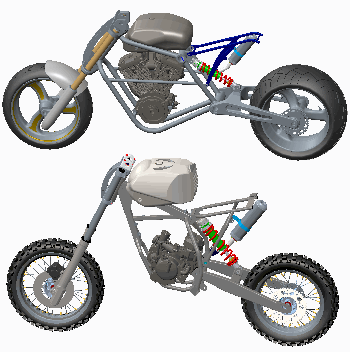
Identify what both motorcycles share before comparing their differences.
Look for a difference that can be offered as an option rather than treated as a separate design.
Compare the two complete products to see how the choices change what the customer receives.
Keep the CAD structure and the controlled product information connected to the same family definition.
Explore product variant managementConnect the product family to a reviewable assembly. Each capability below supports a different engineering task—from defining the architecture to communicating a selected variant.
Organize the family around common structure and product modules. PTC describes both top-down and bottom-up approaches, allowing the starting point to reflect a new platform or an existing design.
A clearer foundation for future variants.
Use suitable Creo parts and assemblies as the basis for product modules. Windchill-supported workflows can bring BOM and configuration information into the process; confirm the products and integration required.
Less repeated definition; more deliberate reuse.
Interfaces and assembly tags help describe how alternative modules connect. Interchangeability depends on those relationships as well as the geometry; swapping a module should be an engineering decision with a defined boundary.
A more repeatable way to assemble alternatives.
Generate the selected product representation and use Creo Parametric checks such as mass properties and interference to investigate it. A valid selection does not replace the engineering review of the assembled result.
Earlier visibility into the product the choices create.
Use the resulting assembly to explain the selected variation to colleagues and downstream specialists. PTC describes use in later simulation and manufacturing activities; verify the receiving workflow and its required data.
A handoff with a defined product and a clear purpose.
PTC’s 2018 datasheet illustrates a configured loader and alternative bucket modules. These images show the documented workflow, not the current Creo interface.
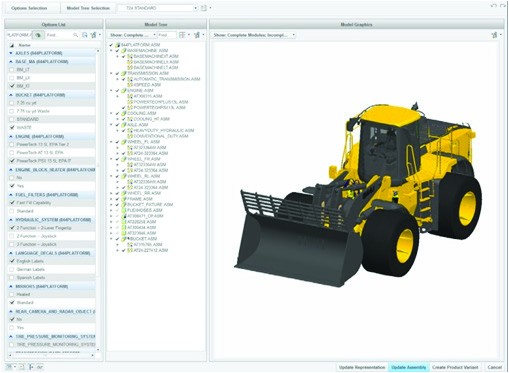
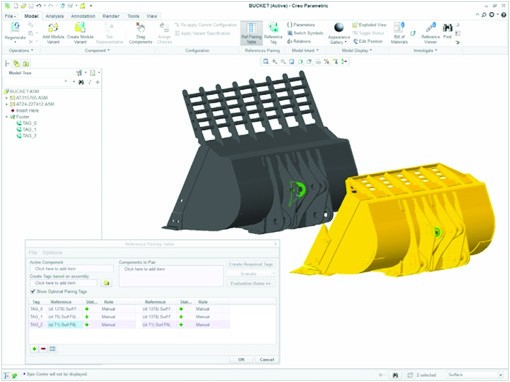
The three-page reference covers modular architecture, module selection, assembly interfaces and configuration review. It identifies certain workflows as requiring Windchill. Confirm current release, license and integration scope with TriStar.
Download the Options Modeler datasheetReview assembly capabilities and package scope around the configurable product.
Illustrative applications connect modular product decisions to the engineering questions each team needs to resolve.
Scroll or swipe to explore all 5 industries. Use Tab to reach each industry link.

Discuss a configurable subsystem with defined interfaces and program requirements. Keep configuration evidence and engineering approval with the responsible team; no certification result is implied. Configurable products in context Which product choices need a traceable review?

Vehicle programs coordinate components across packaging, supplier and manufacturing constraints. Use this setting as a practical example when selecting compatible modules and assembling product configurations. Which product interface and review criteria should guide the evaluation?

Develop an equipment family with alternative tooling, capacity or mounting modules. Make the shared structure and interfaces explicit before reviewing a selected assembly. Configurable products in context Which module alternatives must fit the same platform?

Explore a family of equipment enclosures or mechanical supports. Distinguish common structure from option-specific geometry and review the selected assembly against its packaging needs. Configurable products in context Which envelope or mounting relationship must every variant preserve?

Device teams work within defined design controls and documented review responsibilities. Use this setting as a practical example when selecting compatible modules and assembling product configurations. Which product interface and review criteria should guide the evaluation?
Clarify the architecture, integration and review responsibilities before evaluating a product family.
It supports configurable product structures built from shared architecture and alternative modules. The useful outcome is a precise product representation that the engineering team can inspect, rather than a list of selections without an assembled model.
The datasheet describes Creo Options Modeler Extension as an add-on to Creo Parametric and marks particular architecture/BOM workflows as requiring Windchill. Confirm the exact task, current products, entitlement and integration before specifying the solution.
No. The selected assembly still needs the appropriate engineering checks and approval. Decide how geometry, interference, mass properties and other requirements will be reviewed before the configuration is released.
This page focuses on the CAD architecture, modules and resulting 3D assembly. Broader PLM variant management addresses controlled choices and related product information across the lifecycle. Define which system owns each part of your process.
Bring a representative product family, one shared platform, two meaningful module alternatives and the combinations that matter. Include a typical change, the existing BOM source and the checks required for the final assembly.
Use the 2018 document to frame capability questions, then confirm the current release, supported environment, license and Windchill dependencies. The older reference is not a current package or purchase specification.
Show us a shared platform, meaningful module alternatives and the decisions your team needs to support.
TriStar can help frame a representative evaluation and clarify the Creo and Windchill scope involved.
