Enterprise product lifecycle management

Windchill.Product data.In context.

Connect CAD, parts, and product structures with the change and release processes your teams depend on.

Windchill connects the product recordThe Windchill vector logo connects CAD geometry, a parts structure, product records and controlled release in one PLM foundation. An illustrative relationship diagram, not a software screen.
Keep the product in context.
Windchill, in context

What is Windchill?

See what’s new

Windchill is PTC’s enterprise product lifecycle management (PLM) software. It provides a shared environment for the information that defines a product and the work that develops it. Engineering, manufacturing, supply chain, quality and service teams can work in a connected product context throughout development and beyond release. That continuity helps teams carry product knowledge from one stage of work to the next.

PDM within a wider product lifecycle

Product data management keeps engineering files, versions and revisions under control. PLM connects that information with parts, product structures, changes and lifecycle processes.

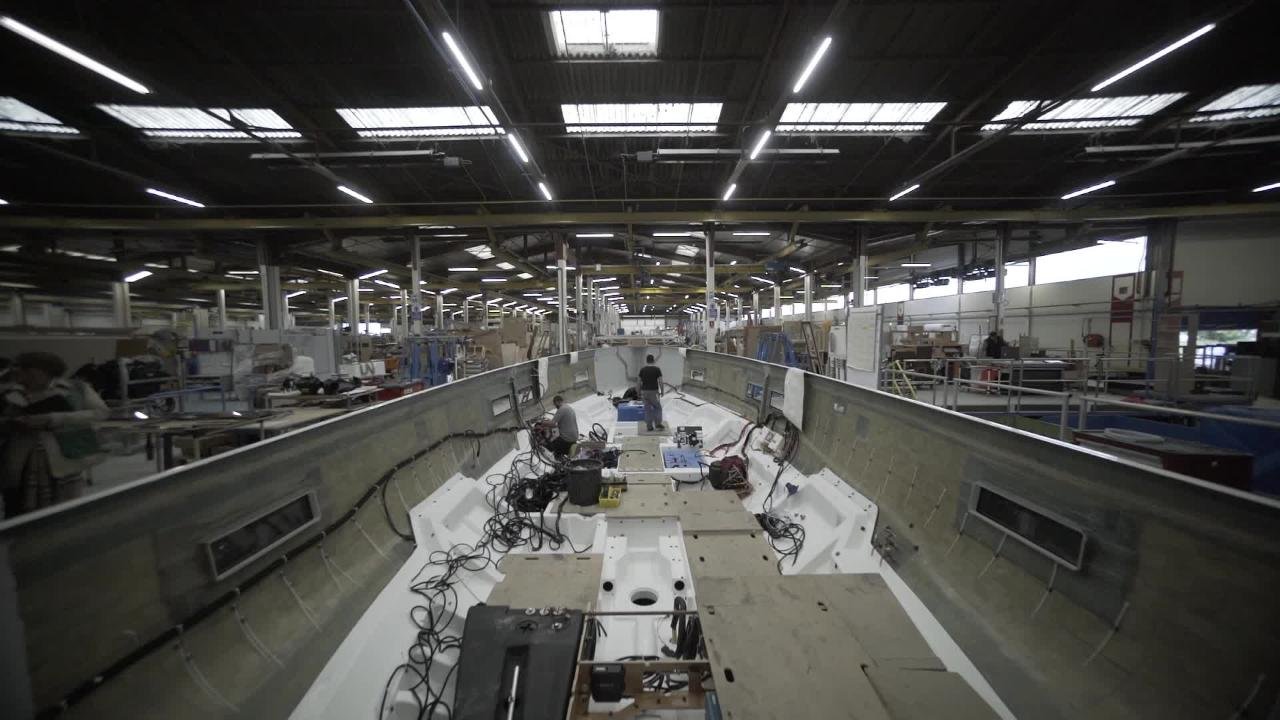
Boat hull assembly on a production floor in the Windchill overview video.
Product overview

Connect capability to purpose

Your product priorities.
A connected path forward.

Select the organizational aim that matters most to your next phase. Each priority connects a working problem to supporting product scope, helping your team decide where attention and ownership are needed.

Improve time to market

Reduce delays between design questions, review decisions and downstream handoffs. Start with a release that waits on clarification: identify which decision is missing, who can make it and what the next team needs before work proceeds.

Reduce operational cost

Focus on duplicate parts, repeated work and disconnected information. Compare the effort of introducing and maintaining a new component with reviewing an existing one, and agree who decides whether reuse is appropriate.

Scale cross-functional collaboration

Keep each role working from the product context it needs. Across departments or locations, agree which decisions belong to each role and how unresolved questions reach an owner before teams act on different assumptions.

Increase efficiency

Spend less effort searching, requesting and re-entering information. For a routine information request, separate the effort of finding an answer from the judgment needed to use it, and keep the responsible person in that decision.

Improve product quality

Bring investigation findings into product and process decisions. When an issue recurs, ask whether its lessons reach the next design review and who is responsible for deciding if a product or process response is needed.

Support product compliance

Keep required evidence, responsibilities and review records organized. Start with a requirement relevant to your product, then agree who assesses the evidence and resolves gaps before the responsible team makes its compliance decision.

Strengthen product traceability

Maintain a reviewable chain across requirements, hardware, software and changes. For a later review, ask whether someone outside the original project can follow the reasoning behind a revision and identify the product configuration that the decision concerns.

Enterprise value, in perspective

Modernize & scale product development
with enterprise PLM

Connect the investment to a focused rollout and a baseline your team can measure.

One foundation. Parallel programs.

Carry a shared product definition across the work.

PTC-reported customer averages

More projects
200%
Faster lead time
50%
Improvement in R&D efficiency
20%
Lower costs of non-quality
40%

Results vary with implementation scope, adoption and starting point. Set a baseline with TriStar.

Discuss your PLM priorities
Explore the functional scope

Control the details.
Connect the decisions.

Start with the work you need to manage. Follow a guide to explore further, or open the scope and review details to see what to confirm.

Define the product

Keep the engineering definition organized as files, parts and configurations.

CAD integration, visualization & PDM

Manage CAD files and documents with their versions and relationships.

Plan authoring integrations and visualization alongside document control and the practices your team uses to check in, revise and release design information.

Scope and review details
  • CAD and document versions
  • Relationships to parts and assemblies
  • Access and lifecycle rules

In practice: Check the drawing revision alongside the model before assigning a design update.

Scope to confirm: Supported authoring tools, versions, connectors, and licenses must be confirmed for your environment.

BOM management

Organize parts into a product definition and bills of material.

Establish part ownership, numbering, and structure views so each team can review the definition it uses.

Scope and review details
  • Part and assembly relationships
  • Engineering product structures
  • Structure review and comparison

In practice: Review a component’s where-used context to identify the assemblies that need attention.

Scope to confirm: BOM views, downstream transformations, and specialist planning tools depend on the selected solution scope.

Product variability management

Manage options and variants around a structured product definition.

Define the rules and ownership that distinguish products by option, market, or effectivity while retaining their shared platform.

Scope and review details
  • Configuration context
  • Options and variant rules
  • Applicability and effectivity

In practice: Identify the intended option set before comparing the product definitions under review.

Scope to confirm: Options, variants, and advanced configuration capabilities require the relevant package, modules, and data model.

Control the work

Manage changes, classification and quality within their product context.

Engineering change & configuration management

Relate requests, reviews, and approvals to affected product information.

Define responsibilities and approval practices for moving a reported need through review to a released result.

Scope and review details
  • Affected and resulting information
  • Review and approval workflow
  • Release history and decisions

In practice: Discuss the affected part, drawing, review responsibility, and intended result in one change context.

Scope to confirm: Workflow configuration, lifecycle states, permissions, and training are part of implementation.

Parts classification

Organize parts by consistent attributes to support search and reuse.

Use a shared classification structure and naming approach to compare existing components before creating new records.

Scope and review details
  • Classification attributes
  • Structured part search
  • Naming and reuse conventions

In practice: Agree which attributes describe a part family and who owns their consistency.

Scope to confirm: Confirm the classification tools, package and data ownership; a similar or classified part still requires engineering review before reuse.

Quality management

Link quality issues and corrective actions to related product information.

Connect nonconformance, complaint and corrective-action processes with controlled records and their change context.

Scope and review details
  • Quality issue context
  • Corrective-action workflows
  • Audit records

In practice: Trace a reported issue to the relevant product record and the team responsible for investigating it.

Scope to confirm: Quality modules, workflows, permissions and regulatory validation are scoped separately; the platform alone does not establish compliance.

Connect delivery

Coordinate design reviews, manufacturing planning and supplier information.

Collaborative product & supplier development

Coordinate engineering reviews and co-development across teams and partners.

Share the design context needed for a review, relate feedback to the affected product information and retain ownership of the response.

Scope and review details
  • Shared design context
  • Product review and feedback
  • Controlled external participation

In practice: Agree which partner can review a design package and who owns the response to a proposed change.

Scope to confirm: Navigate apps, View and Contribute roles, and custom experiences require entitlement and permission review.

Manufacturing process management

Connect engineering information to manufacturing structures and process planning.

Clarify ownership of the manufacturing view, how engineering changes are reconciled, and which systems receive released information.

Scope and review details
  • Engineering-to-manufacturing context
  • Manufacturing structures and plans
  • Downstream change review

In practice: Discuss whether a revised engineering part also requires attention in the manufacturing structure or plan.

Scope to confirm: Manufacturing planning, work instructions, and enterprise integrations are scoped separately; availability is not universal.

Supply chain collaboration

Keep supplier and sourced-part information connected to the product definition.

Relate preferred sources and supplier or manufacturer parts to engineering structures, with controlled information sharing where needed.

Scope and review details
  • Supplier part relationships
  • Preferred source context
  • Controlled information exchange

In practice: Identify which supplier information purchasing needs and which product changes should prompt a review.

Scope to confirm: Confirm partner access, supplier-data scope and integrations; controlled sharing depends on configured permissions.

Intelligence built on product context

A foundation for
AI-driven PLM value

Explore three ways governed product information can support AI-assisted work: finding reuse candidates, understanding documents and keeping connected decisions in context.

AI-driven part intelligence

Use AI Parts Rationalization to identify similar or duplicate parts in supported product data, then review candidates for reuse.

A useful starting point

Which existing part deserves an engineering review before a new one is created?

AI assistants

Ask natural-language questions and summarize relevant product information with Windchill AI Assistant, within its supported data scope and access controls.

A useful starting point

Which indexed document would help your team answer a recurring product question?

A connected digital thread

Relate PLM, ALM and manufacturing context so a change discussion can follow the product relationships and the people responsible for them.

A useful starting point

Where does a cross-team decision lose its product context today?

The right context for the right team

Product information.
A wider working audience.

Connect engineering authors with manufacturing, quality, supply chain and service teams through task-focused access.

Person using a tablet in a warehouse, with supply-chain and information icons.

Windchill: manage the definition.

Authors, administrators and expert reviewers maintain the product definition other teams rely on. They work with the relationships and lifecycle context that explain which design records belong to a product configuration. When a component changes, this environment supports the responsible team in assessing and managing that change before downstream teams act on it.

Navigate: access for specific tasks.

Manufacturing, quality, supply chain and service colleagues need product information for their own decisions. Navigate brings relevant data and, where configured, a permitted contribution into a focused task without requiring the user to manage the underlying CAD files. The information remains connected to the governed product record, with access determined by roles and permissions.

Choose the operating model

One product foundation.
Different delivery responsibilities.

Compare the environment, ownership, and update practices alongside the workflows you need. Cloud hosting and SaaS are different choices.

Managed deployment

Windchill

Plan an on-premises or cloud-hosted environment. TriStarCloud private or hybrid hosting is a separately scoped option.

Platform operation
Define infrastructure and application ownership with your IT team or hosting partner.
Updates
Plan supported versions, upgrades, and the responsibilities for maintaining your environment.
Connections & configuration
Confirm supported integrations and configuration for your systems.
PTC SaaS delivery

Windchill+

PTC’s SaaS delivery shares Windchill’s codebase, with managed platform operations and updates.

Platform operation
PTC manages infrastructure, platform operations, monitoring and maintenance through the SaaS model.
Updates
Review the SaaS update model, feature delivery and the preparation your team needs.
Connections & configuration
Use supported configurations and deployment practices; confirm integrations, packages, user roles and customization scope.
Enterprise packages

Compare the scope.
Plan your package.

Compare TriStar’s published Windchill package features, then talk with our team about the users, integrations and extensions your environment needs.

Check marks show listed scope; dashes mean not listed in that package. Extensions are separately scoped. Confirm current package entitlements and pricing with TriStar.

Get quote opens TriStar’s live contact form. Include the package name in your message.

TriStar’s published Windchill enterprise package comparison
Package scope✓ Listed   – Not listedWindchill BaseGet quoteWindchill AdvancedGet quoteWindchill PremiumGet quoteExtensionsGet quote
Standard Capabilities
Core PDMListed in packageListed in packageListed in packageNot listed
Visualization (AR, 3D, 2D)Listed in packageListed in packageListed in packageNot listed
Design CollaborationListed in packageListed in packageListed in packageNot listed
Project Planning/ExecutionListed in packageListed in packageListed in packageNot listed
Document ManagementListed in packageListed in packageListed in packageNot listed
Business Systems IntegrationListed in packageListed in packageListed in packageNot listed
Change ManagementListed in packageListed in packageListed in packageNot listed
PTC Non-CAD IntegrationListed in packageListed in packageListed in packageNot listed
Secure Collaboration
AgreementsNot listedListed in packageListed in packageNot listed
Security LabelNot listedListed in packageListed in packageNot listed
EBOM Management
BOM ManagementNot listedListed in packageListed in packageNot listed
Enterprise Change ManagementNot listedListed in packageListed in packageNot listed
Basic Options and VariantsNot listedListed in packageListed in packageNot listed
XBOM Management
BOM TransformationNot listedNot listedListed in packageNot listed
Component Management
Parts ClassificationNot listedNot listedListed in packageNot listed
Supplier Part ManagementNot listedNot listedListed in packageNot listed
Data Management and Visualization Extensions
Creo, SolidWorks, NX, AutoCAD etcNot listedNot listedNot listedSeparately available extension
Enterprise Visualization Extensions
Visualize Model and Drawings: Creo View MCAD and Add-OnsNot listedNot listedNot listedSeparately available extension
Visualize ECAD Data: Creo View ECAD and AdaptersNot listedNot listedNot listedSeparately available extension
Visualization Toolkits (Office, WebGL, Java)Not listedNot listedNot listedSeparately available extension
Interference/Clash DetectionNot listedNot listedNot listedSeparately available extension
View 8 listed features

Standard Capabilities

  • Core PDM
  • Visualization (AR, 3D, 2D)
  • Design Collaboration
  • Project Planning/Execution
  • Document Management
  • Business Systems Integration
  • Change Management
  • PTC Non-CAD Integration
View 13 listed features

Standard Capabilities

  • Core PDM
  • Visualization (AR, 3D, 2D)
  • Design Collaboration
  • Project Planning/Execution
  • Document Management
  • Business Systems Integration
  • Change Management
  • PTC Non-CAD Integration

Secure Collaboration

EBOM Management

View 16 listed features

Standard Capabilities

  • Core PDM
  • Visualization (AR, 3D, 2D)
  • Design Collaboration
  • Project Planning/Execution
  • Document Management
  • Business Systems Integration
  • Change Management
  • PTC Non-CAD Integration

Secure Collaboration

EBOM Management

XBOM Management

  • BOM Transformation

Component Management

View 5 extensions

Data Management and Visualization Extensions

  • Creo, SolidWorks, NX, AutoCAD etc

Enterprise Visualization Extensions

  • Visualize Model and Drawings: Creo View MCAD and Add-Ons
  • Visualize ECAD Data: Creo View ECAD and Adapters
  • Visualization Toolkits (Office, WebGL, Java)
  • Interference/Clash Detection
Windchill 13.1.2 highlights

New capabilities.
A clearer way to work.

A short preview of the working changes. Explore the release guide for detailed capabilities and update planning.

  • A refreshed working experience

    Explore the updated home view, dashboards and everyday interface changes.

  • A connected product definition

    Review manufacturing, connected BOM and product-impact updates in the release guide.

  • More ways to bring teams into the work

    Explore browser-based Product View and Navigate task updates, with release-specific scope.

Industry perspectives

Windchill for
your Industry

Explore a different product-review question in each sector.

Jet engine in an aerospace manufacturing facility
Aerospace & Defense

Keep program configuration in view.

Review an actuator revision against affected drawings, parts and program configurations before sharing released information with a supplier.

Review focus

Which configurations does this change affect?

Explore Aerospace & Defense
Complex industrial machinery and mechanical assemblies
Industrials

Carry configuration into the working life.

Follow an option change from a common machine platform into manufacturing planning and service parts.

Review focus

Which configuration belongs to this machine?

Explore Industrial Machinery
Precision manufacturing equipment for electronic components
Electronics & High-Tech

Review component changes across disciplines.

Review a component replacement alongside mechanical design, software references and the released product structure.

Review focus

Which revision belongs in this product build?

Explore Electronics & High-Tech
See the work in practice

Customer stories.
Practical reading.

Explore customer perspectives, technical documents and practical sessions for your next step.

Compare platforms against your workflow.

When evaluating Windchill alongside Teamcenter, ENOVIA or Arena, compare representative BOMs, CAD/ERP connections, user roles, deployment, scale and total operating responsibilities.

PLM Consulting
Before your next discussion

Windchill questions.
Practical next steps.

Use these questions to find the right planning detail for your team.

How should we choose between Windchill and Windchill+?

Compare platform ownership and update responsibilities first, then confirm the integrations and configuration your environment needs.

Compare delivery models
How do we plan access for downstream teams?

Start with a specific task, such as drawing review, and identify who needs to view or contribute before selecting apps and roles.

Review team access
Are all listed capabilities included in every package?

Package scope and extensions vary. Confirm users, integrations, modules and current entitlements with TriStar before selecting a package.

Compare enterprise packages
What should we bring to a first Windchill conversation?

Bring one workflow, the product information it uses and the people responsible for the next decision. Discuss implementation, training and ownership around that workflow to identify a focused starting point.

PLM Implementation
Your next product connection

Your product information.
A clearer path forward.

Bring us the product structure, release process, or data handoff you want to improve.
We’ll help scope Windchill around your teams, delivery environment, and next practical step.

Talk to a Windchill specialist
Start a conversation

Where should Windchill
make the connection?

Select a priority to start the conversation.

Choose a priority above.