Return to the right work
Less time spent recovering where a task left off means more attention for the engineering question itself.
Where does the team lose momentum between tasks?

A clearer working experience. More connected manufacturing. New ways to put product information to work.
Plan your update with TriStarWindchill 13 brings changes to the way teams find product information, prepare manufacturing definitions and involve people in a review. This guide turns those release themes into workflows you can evaluate with TriStar.
Explore the Windchill platform
The featured 13.1.2 release sits within the wider Windchill 13 family. Some capabilities arrived in earlier 13.x releases; the appropriate maintenance level and available features depend on your environment.
An update is useful when it improves a real task. Use these three outcomes to decide where a release review should begin, then explore the relevant capabilities below.
Less time spent recovering where a task left off means more attention for the engineering question itself.
Where does the team lose momentum between tasks?
Related products are easier to maintain when common work has a dependable starting point, while genuine differences remain visible.
How much effort goes into keeping related definitions consistent?
A review is more useful when a participant knows the decision they are being asked to make and can return an actionable response.
What makes a review complete for the next person?
Explore three interface changes through the tasks they support: returning to work, reading a product structure and organizing information.
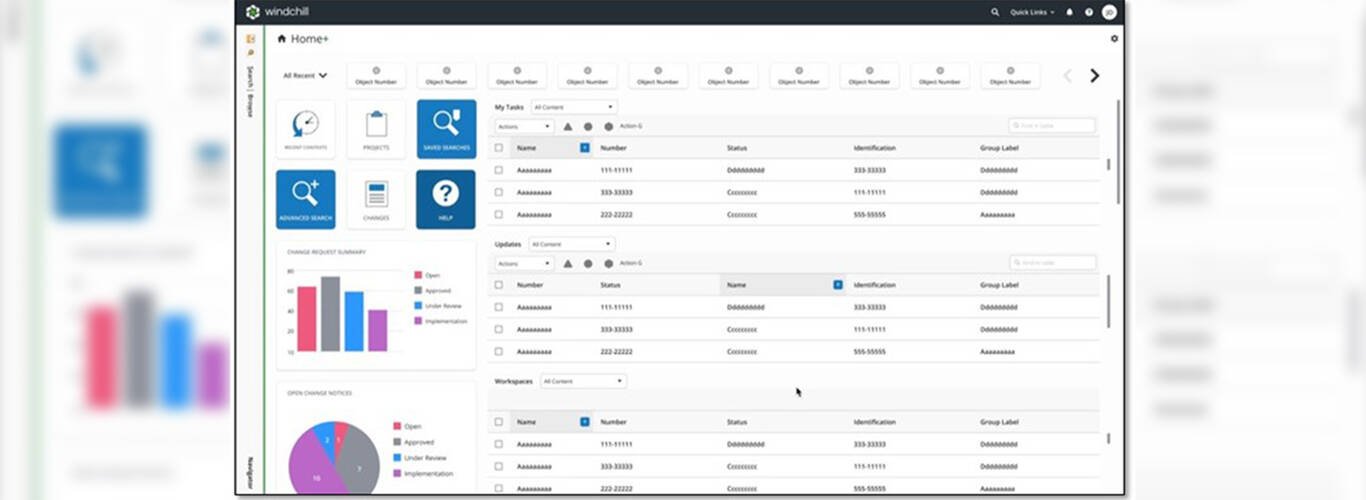
Quick actions and recently used shortcuts provide entry points into work in progress. Embedded graphs give the home view a concise status overview.
Start at the home view after an interruption. Check whether the engineer can resume the assigned task without searching through several locations.
Updated BOM reporting brings report selection, configurable layouts and Excel export into a more consistent working experience.
A bill of materials lists the parts in a product. Before sharing a report, check its chosen structure and configuration; presentation alone does not establish the right product definition.
Updated tables across folders, projects, products and libraries add search, inline filters, column organization and keyboard navigation.
Use a familiar product set to review the experience. Which columns and filters help your team answer its question, and do the right permissions remain in effect?
Interface availability varies by area, release and configuration. Review these changes with your own roles, customizations and target maintenance level; a refreshed interface does not change who approves the work.
Engineering defines the product. Manufacturing planning determines how to build it. These updates connect variant structures, operations and the systems that receive the plan—three different responsibilities to review together.
Mass generation derives manufacturing BOMs from a generic mBOM and variant engineering BOMs or specifications.
A manufacturing BOM describes the parts needed to build a product. For a machine family, review the common structure first, then check what changes with each option.
Does each generated structure match the intended configuration?
A diagram-based editor supports process planning, with template-based generation, updates and mass changes across variant plans.
A process plan describes the operations and resources used to build the product. Compare two machine options: which operations stay common, and which need a different sequence, resource or control?
Does the plan still describe how this variant will be built?
Process-plan integration carries manufacturing information into ERP and MES environments through supported connections.
ERP supports business and production planning; MES supports shop-floor execution. Agree what each system receives, which revision it uses and how a rejected or changed transfer is resolved.
Who confirms that the receiving system has the right information?
PTC Product View Web brings browser-based 3D visualization to Windchill. Engineering and manufacturing participants can see product geometry in its working context without installing a separate viewing plugin.
PTC identifies Product View Web with Windchill 13.1.2. Check the supported viewing functions and access for the proposed environment.
Configured links connect Codebeamer requirements with Windchill Control Characteristics and Resources. Connections from parts to CAD and requirements help engineering and downstream teams follow the reason behind a product definition.
Start with the requirement that describes what the product must do.
Select a requirement and follow its part and CAD references before opening the manufacturing dependencies.
Where would a missing relationship leave the impact assessment incomplete?
Explore CodebeamerSupported releases, integration configuration and access determine which information can be linked. Each application keeps ownership of its records; the connection supplies context for assessment and does not make the engineering decision.
BOM roll-ups aggregate eligible attributes across a selected product structure, providing a product-level view for comparing design choices.
A total is a starting point for a question, not the answer. Choose a review lens below, then inspect the records behind the result.
| Review lens | What to inspect |
|---|---|
| Sustainability | Look at material choices and the product attributes used in your environmental assessment. What source data and assessment method support the comparison? |
| Cost | Inspect the contributing part and material attributes before comparing the selected configurations. Are the values complete, comparable and defined on the same basis? |
| Manufacturing | Review the materials and product attributes that inform sourcing and manufacturing discussions. Which contributing parts or material records need a closer review? |
PTC positions Windchill 13.1.2 as a foundation for AI-assisted product work. The Assistant and Parts Rationalization address different evidence: information in supported documents and the shape of existing parts. Their availability depends on the supported environment.
Use supported indexed document content to investigate a focused question or summary. Keep the source material in view when deciding whether the response is useful.
For a specification question, inspect the referenced passage and its context before using the information.
Investigate duplicate or similar shapes as candidates for further review. A shape match gives the team a starting point for examining possible reuse.
For a candidate part, review material, dimensions, function and product context before deciding it is suitable.
Explore the supported document and parts workflows, preparation questions and deployment considerations in one dedicated guide.
Confirm the supported maintenance level, matching plugins, deployment, licensing, source preparation and user access for each AI capability. Engineering review and the governed change process remain with the responsible team.
The product platform, task applications and connected tools have different release and entitlement boundaries. Keep those boundaries visible when deciding what to evaluate.
| Platform or application | Review focus | What to confirm |
|---|---|---|
| Windchill 13 family | Core product information and manufacturing workflows | Use the featured 13.1.2 highlights as a starting point. Confirm your supported target maintenance level, modules and customization scope. |
| Product View Web & Navigate | Browser review and role-based task access | Check compatibility between Windchill and the proposed application releases. |
| Connected collaboration | Sharing around the governed product record | PTC Jetstream is a separate collaboration product. Confirm the supported connection, participant access and collaboration scope for your environment. |
Bring your current release, modules, integrations and key customizations.
Select one representative product structure and the people who work with it.
Define the tests, responsibilities and training needed before a wider rollout.
A focused pilot makes a release review concrete. These starting questions connect the changes above to a product context; the industry guides explore the wider business setting.

Select a small machine family and its planning owner. Compare an agreed reference plan with the trial result reviewed by that owner.
What evidence would let the planning owner accept the trial?

Choose one program team and a controlled assembly change. Agree the review participants and the evidence needed to close their assessment.
Who records the program team’s decision?

Choose a hardware/software change that crosses team boundaries. Identify the owner of each handoff and how an unresolved dependency will be recorded.
What would prevent this pilot from moving to the next team?
Resolve these questions before committing to an update.
No. These highlights span the Windchill 13 family. For example, the revised BOM Reports interface and Process Plan Flow are documented in 13.1.1. Confirm each capability against your current and target releases.
There is no single target for every installation. TriStar can help establish a supported path after reviewing your starting environment.
Not automatically. Keep desktop-dependent tasks in the evaluation before changing reviewers’ tools.
Do not assume that a release highlight is part of an existing entitlement. Have TriStar confirm the proposed scope before enabling it.
Use the three-step preparation checklist above. Add the business problem you want the update to resolve.
Talk with TriStar about a focused next step for your team.
Talk to TriStar