PTC application lifecycle management

Codebeamer.Make change
traceable.

Keep decisions and evidence in view as your software-driven products change.

What is Codebeamer?
Seven connected areas surround the Codebeamer mark: requirements management, risk management, validation, software development, DevOps, product line management and analytics.
The platform, in context

What is Codebeamer
and what is it used for?

Codebeamer is a configurable application lifecycle management (ALM) platform for complex product development. ALM is the practice; Codebeamer connects the people, records and workflows that support it.

Teams use it to manage requirements, risks, testing and product variants, reuse work across product lines, and support compliance activities. Configured integrations connect software lifecycle information with the wider engineering digital thread.

Explore Codebeamer capabilities
Product overview1:41
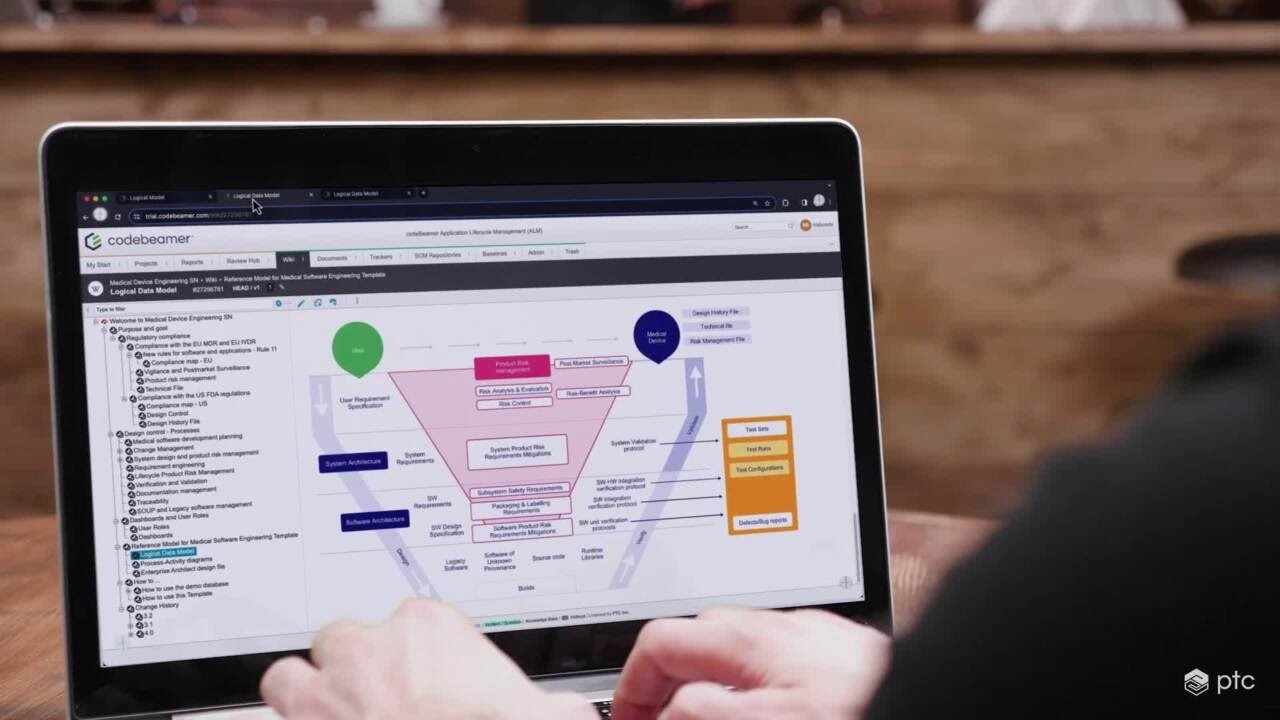
A person at a laptop alongside a Codebeamer lifecycle diagram in the product overview video.
Watch in external player

The value in everyday work

What are the benefits
of Codebeamer?

Focus on how your team works: shared context for decisions, continuity between tools and a process you can shape.

Bring the decision into focus.

A conversation around a shared engineering record brings different perspectives into one discussion. The useful outcome is a clear next question, an understood tradeoff or an agreed responsibility for the work ahead.

  • One connected workspace

    Give reviews a shared working context by bringing requirements, risks and tests together in the browser.

    When colleagues join a discussion at different times, a common record gives them the background behind the current decision.

  • Toolchain continuity

    Keep established tools in the workflow through supported integrations configured for your process.

    During a handoff between teams, linked information can help colleagues understand what has changed without reconstructing the conversation from messages.

  • Agile coordination

    Coordinate team priorities through a shared view of backlogs, iterations and releases.

    When priorities shift midweek, teams can discuss competing commitments together and agree what belongs in the next planning conversation.

  • Visible lifecycle links

    Follow relationships across requirements, verification and release to investigate the reach of a change.

    When a decision is revisited months later, lifecycle relationships offer a route back to the engineering context behind it.

  • Purposeful reuse

    Carry shared engineering assets across product lines while keeping the differences between variants defined.

    For teams extending an established product, shared material provides a starting point for discussing what remains relevant and what differs.

Inside the platform

Discover the key features
of Codebeamer

Compare six connected areas of work. Open a feature for its working detail, practical examples and configuration scope.

Requirements with traceability

Create, organize, discuss, and review requirements in their engineering context.

View working detail

Keep the intent open to review.

Connect requirements to downstream work and use review workflows to capture feedback and decisions. Version history and trace relationships help teams investigate the effect of a revision.

The work it supports
  • Structured requirements and relationships
  • Review comments and decisions
  • Version and change context
In practice

A wording change can be reviewed alongside the requirement’s rationale and related tests.

Scope the tools: Define item types, relationships, permissions, and review responsibilities for your process.

Traceability & insight

Explore relationships and report on the lifecycle information your team maintains.

Traceability views, reports, and dashboards help teams investigate coverage, change impact, and release context. Their usefulness depends on the relationships, data quality, and working practices behind them.

  • Trace relationship views
  • Configured reports and dashboards
  • Information for change and coverage reviews

A coverage review checks for missing relationships and examines the data included in its configured report.

A report reflects its configured scope and recorded data.
Risk and compliance workflows

Document and manage risks with connections to the development records they affect.

View working detail

Put risk in the working context.

Codebeamer supports risk-management workflows. Teams can connect risks, requirements, mitigation activities, and testing as part of their controlled process.

The work it supports
  • Risk records and related work
  • Mitigation and verification links
  • Configured process and review records
In practice

A risk review can follow its mitigation requirement to the relevant verification activity.

Scope the tools: Traceability supports compliance work within your quality process.

Testing and quality

Plan testing, manage test cases, and track execution alongside requirements.

View working detail

Bring tests back to their purpose.

Use connected test definitions and results to examine coverage and identify gaps. Keep the test plan, execution environment, and relevant requirement version in view when reviewing evidence.

The work it supports
  • Test cases linked to requirements
  • Test plans and execution records
  • Coverage information for review
In practice

A team follows an updated requirement to the cases it needs to examine and the results it needs to refresh.

Explore test coverage image

Scope the tools: Scope automation connections, result imports, execution practices, and access with your team.

Product-line variation

Manage baselines, branches, and reusable engineering assets as products evolve.

View working detail

Reuse with a defined context.

Product-line configuration capabilities help teams work with common and variant information. Review changes against their applicable baseline rather than treating every version as interchangeable.

The work it supports
  • Baseline and branch context
  • Reusable requirements and tests
  • Controlled product variation
In practice

A common requirement can be considered across product variants while teams review the effect of a proposed change.

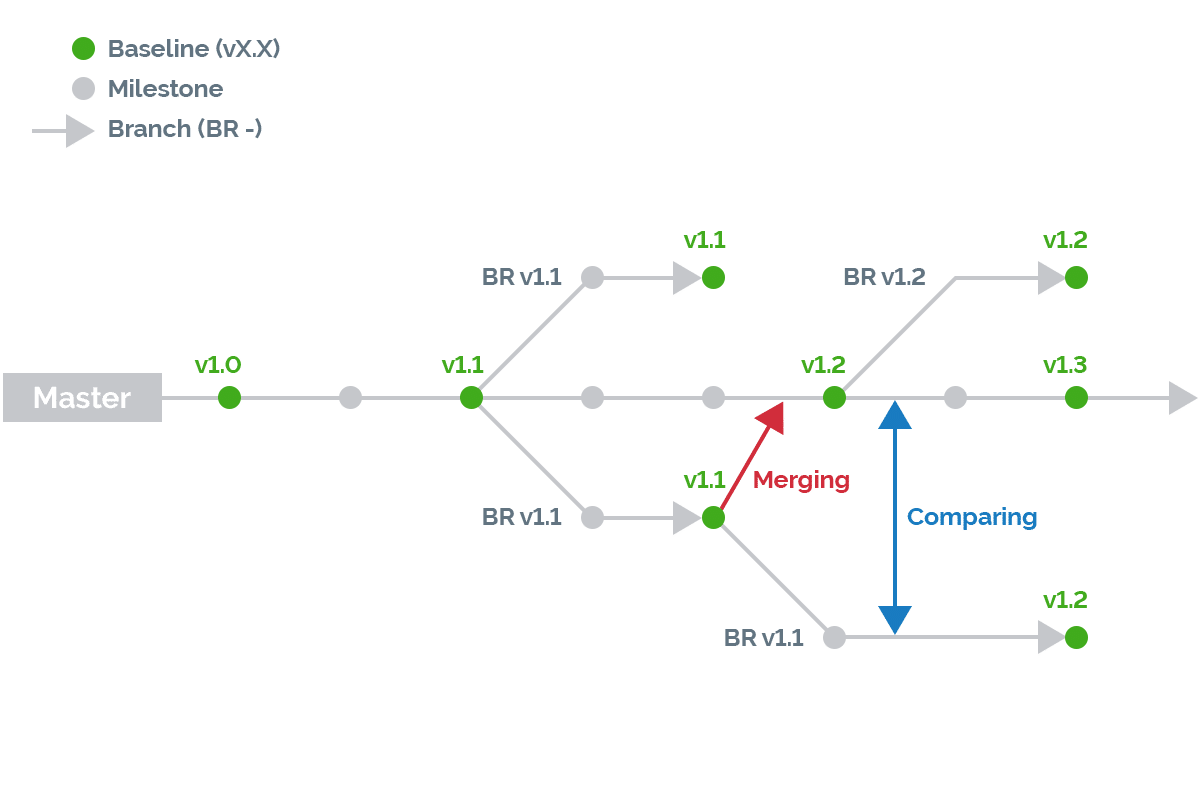
Product line diagram showing master and branch streams, baselines, milestones, merging and comparing.
Branches, baselines and comparisons.
Open product-line diagram

Scope the tools: Confirm the required configuration and product-line capabilities for your selected offering and workflow.

DevOps and release coordination

Coordinate releases with the development tools your team already uses.

View working detail

Coordinate the release path.

Version-control and CI/CD integrations can bring established engineering tools into the lifecycle conversation.

The work it supports
  • Connected development-tool records
  • Release and pipeline context
  • Related requirement and test information
In practice

A release review checks which requirement and test records a configured pipeline exchange carries.

Scope the tools: External systems, integration components, supported versions, and licensing require confirmation.

Connected software development

Coordinate backlogs, work items, and releases through Agile, Waterfall, or hybrid processes.

View working detail

Connect the plan to development.

Configured workflows connect planning with development and testing. Relate requirements, implementation work and code through testing and release.

The work it supports
  • Backlogs and planned releases
  • Workflow and work-item context
  • Related implementation and verification work
In practice

An iteration review checks a backlog item’s owner, planned release and verification work.

Scope the tools: Define workflow stages, work-item ownership and review responsibilities for your process.

A closer look at requirements

Read the requirement.
Keep its context in view.

Explore requirements, development planning and test coverage. Choose a view, then open its full image for a closer look.

Explore the requirements view.

Explore the requirements view.
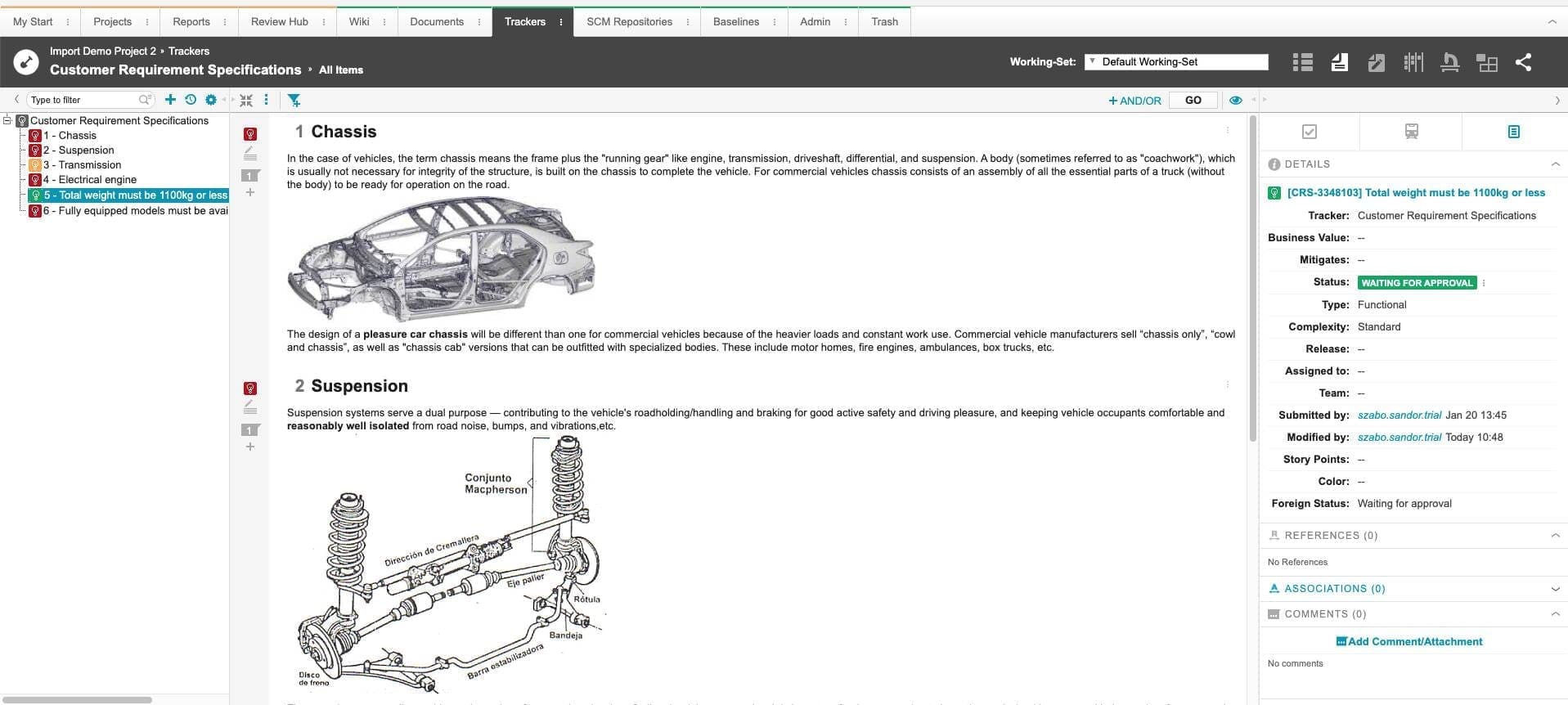
Codebeamer demonstration requirements workspace with a requirement outline at left, chassis and suspension document in the center, and selected-item details at right.
Open full image

Document

The central document combines requirement text with chassis and suspension illustrations.

Outline

The left-hand outline organizes the customer requirements and shows a selected weight requirement.

Details

The right-hand panel shows the selected requirement’s fields, status, references, and comments.

Explore the requirements view.

Zoom for detail. Scroll inside the image to read the original screenshot.

Codebeamer demonstration requirements workspace with a requirement outline at left, chassis and suspension document in the center, and selected-item details at right.

Software work items and sprint planning

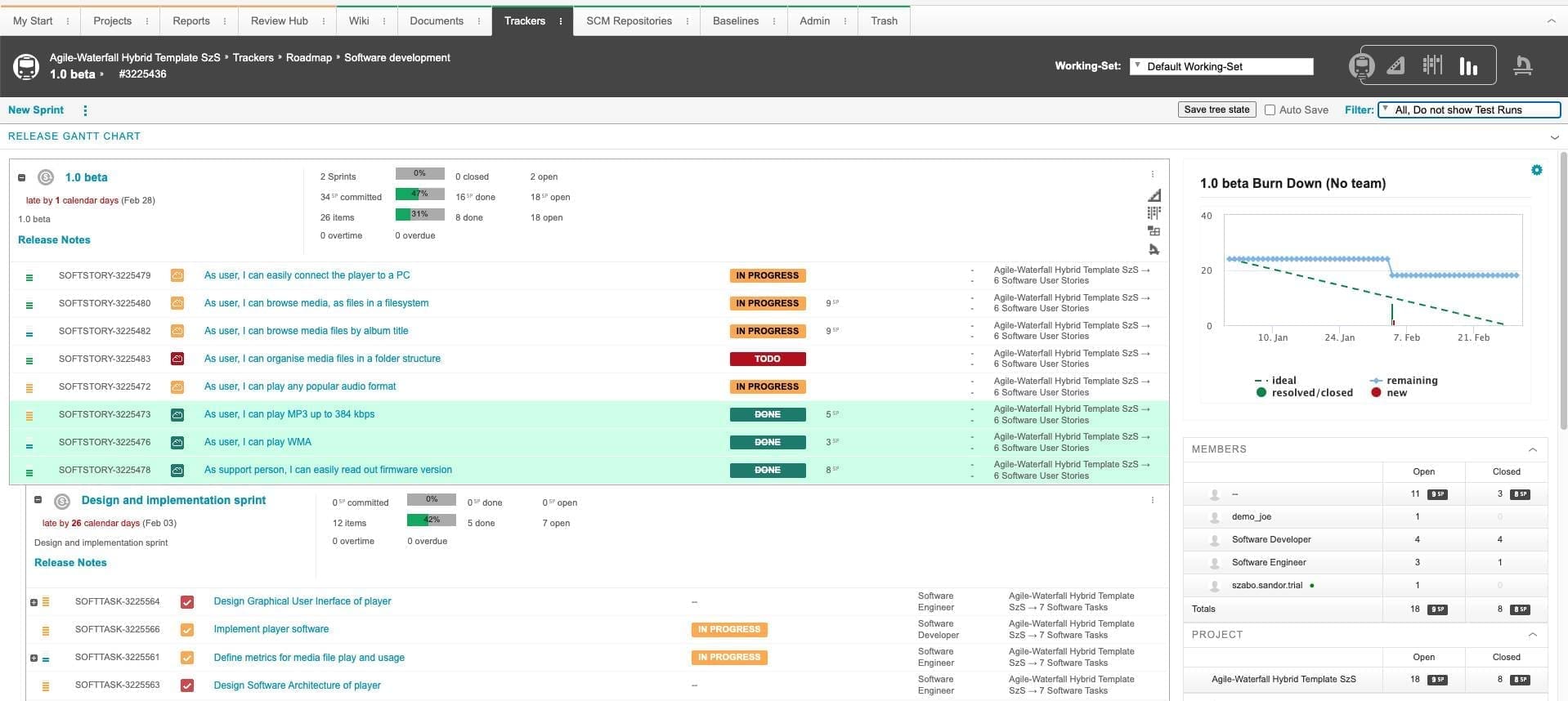
Codebeamer software development view with a task backlog, work-item details and a sprint burndown chart.
Software work items and a sprint burndown.Open full image

Requirements and their test coverage

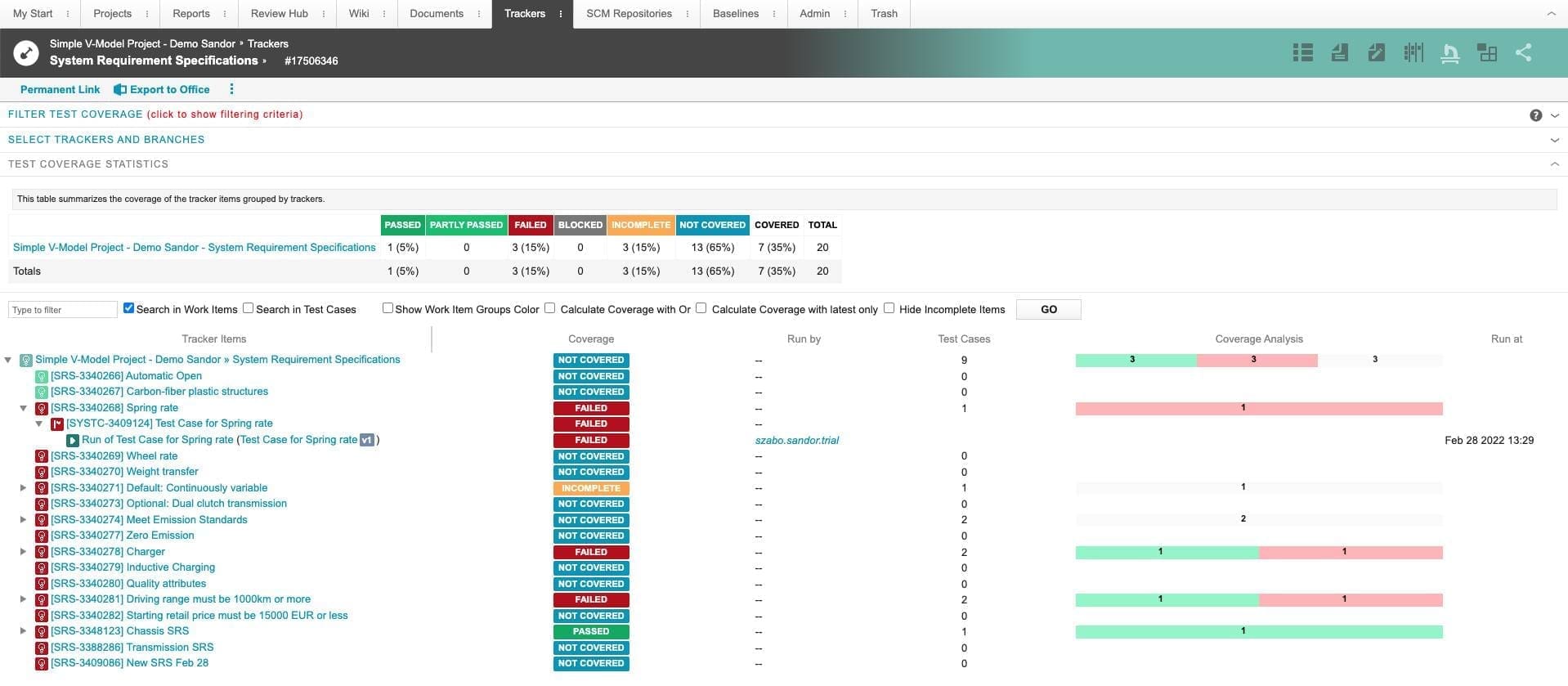
Codebeamer demonstration test coverage view with summary counts, a requirement and test hierarchy, coverage statuses, and analysis bars.
Requirements, test records and coverage.Open full image
Part of your engineering environment

Connect the tools.
Keep ownership clear.

Define the authoritative record and the exchange between ALM, development tools, and PLM.

Windchill product context

Connect ALM information with the product definition managed in Windchill. Preserve the distinction between software lifecycle records and controlled product configuration.

Connections depend on supported products, versions, configuration, integration components, and licensing. Define record ownership, link direction, permissions, and maintenance before rollout.

The platform and its operating model

Codebeamer or Codebeamer+.
Scope the environment.

Compare operational responsibilities alongside the workflow. Confirm current availability and commercial terms with TriStar and PTC.

Both options share the Codebeamer codebase. Here, compare who runs the service and how releases fit your organization’s operating process. The linked guides explain platform changes and the SaaS delivery model in more detail.

Managed by your organization

Codebeamer

Environment

Plan the application environment and administration around your organization’s IT requirements.

Responsibilities
  • Infrastructure, security, and maintenance responsibilities
  • Supported versions and connected systems
  • Upgrade, validation, and operational processes
What to evaluate

Who owns the environment, and what must the rollout fit?

Explore Codebeamer updates
PTC SaaS offering

Codebeamer+

Environment

PTC’s SaaS offering brings Codebeamer into a cloud service model, with a different division of operational responsibilities.

Responsibilities
  • Service operations and available environment options
  • Identity, integrations, and data requirements
  • Release planning and customer process responsibilities
What to evaluate

How does the service model fit your governance and integration needs?

Explore Codebeamer+
August 2026 release highlights

What's new
in Codebeamer

Three announced releases, with distinct scopes for your upgrade plan.

Core platform

Codebeamer 3.3

Parallel streams, with a defined change path.
  • Delta Merge

    Carry an approved change across related variants through a controlled merge process.

  • Streams tab

    Track variant development lines in one view.

  • Stream permissions

    Apply role-based control to stream management and change approvals.

Deeper Windchill integration extends the connection between lifecycle records and product context.

Review compatible versions, licensed scope, connected systems and your validation process with TriStar.

ALM in a product context

Industry applications
of Codebeamer and ALM

See how connected lifecycle information supports the decisions each development team needs to make.

Variants & verification

Automotive embedded systems

Coordinate software requirements, product variants and verification across engineering teams and suppliers. Connect changes to the work and evidence they affect.

A useful review question

When an ECU requirement changes, which variants and tests need another review?

Explore automotive
Robotic assembly arms positioned around an unfinished vehicle body on an automotive production line.
Risk controls & evidence

Medical device development

Keep device-software requirements, risk controls and testing connected within your quality process. Preserve review context when investigating changes and preparing evidence.

A useful review question

When device software changes, which risk controls and verification evidence need another look?

Explore MedTech
Medical imaging-system gantry beside exposed precision mechanical assemblies in a manufacturing environment.
Before your next lifecycle decision

Codebeamer FAQs.
Clear answers.

Practical guidance on process fit, integrations, AI and SaaS delivery.

Who should be involved in a Codebeamer evaluation?

Include engineering, test, quality and process owners, alongside IT. Together, they can define representative records, review responsibilities, integrations and operating constraints.

Can hardware and software teams use it together?

Yes. Codebeamer supports cross-discipline lifecycle work. Define the requirements, risks and tests it owns and the authoritative records retained in connected tools.

Can we tailor templates to our process?

Yes. Adapt predefined artifacts, workflows and terminology to your process. Confirm licensed template scope and assess changes within your quality process.

Does Codebeamer make a project compliant?

Codebeamer can support traceability, reviews and baseline evidence. Compliance still depends on your applicable obligations, configured process, validation and the evidence maintained.

Is Codebeamer AI included in a standard license?

No. Codebeamer AI is a separately licensed add-on. Confirm entitlement, available capabilities, supported environment and data-governance requirements for your intended use.

How should AI suggestions be used?

Use suggested requirement wording and test cases as review material. Engineers should check accuracy, relevance and coverage before accepting changes within their established development process.

Can we keep our development tools?

Supported connections cover areas such as version control, CI/CD and test automation. Scope the actual exchange, supported versions, connector ownership, maintenance and licensing before rollout.

How does the Windchill connection work?

OSLC links can relate ALM artifacts to product information across Codebeamer and Windchill. Define supported releases, link direction, permissions and record ownership for the proposed connection.

Can we migrate information from another ALM tool?

Migration options exist for tools including DOORS, Polarion and Windchill RV&S. Scope the selected provider, mappings, relationships, history and reconciliation checks; supported coverage varies.

How are Codebeamer+ operations and upgrades handled?

Codebeamer+ provides the platform as a SaaS service. Agree responsibilities for identity, integrations, data and your development process. Upgrades, minor updates and rehosting involve scheduled downtime, so agree timing and process impact while keeping the environment on a supported version.

Can an existing Codebeamer environment move to Codebeamer+?

Review configurations, templates, data, workflows and integrations before agreeing a conversion plan. Customizations or integrations may need supported alternatives; your team validates the converted solution.

Your next development advantage

Your product.
A clearer path through change.

Discuss the Codebeamer workflow and support your team needs.

Talk about Codebeamer
Start a conversation

What would you
like to connect?

Select a priority to start the conversation.

Choose a priority above.