PTC technical publishing

Arbortext.Create once.
Publish in context.

Turn technical knowledge into reusable content. Connect authoring, publishing, and delivery around the products your customers use.

Technical information, connected

What is
Arbortext?

Arbortext is a family of tools for creating, managing and publishing technical information. Publications teams can combine structured XML text with illustrations, manage content through Windchill integrations, and prepare outputs for different audiences.

  • Structured XML
  • Technical illustrations
  • Product context
Explore the product family
Two technicians in hard hats reviewing information together on a laptop.
A stronger publishing foundation

Why
Arbortext?

Support the specialists creating technical information and the people who rely on it.

  • Work within established standards

    Give contributors a consistent structure for the document standards your publications require.

  • Bring subject experts into authoring

    Subject specialists can contribute through structured authoring without first becoming XML experts.

  • Keep engineering references close

    With a configured Windchill connection, CAD-derived illustrations and metadata can stay tied to product information.

  • Coordinate content changes

    Give authors and reviewers a shared basis for assessing publication changes.

  • Give readers relevant context

    Define product applicability and reader roles when configuring content delivery.

One product. Many working perspectives.

Arbortext benefits
across the value chain

Explore how technical information supports the teams working around a product.

From source to service

Key features
of Arbortext

Explore ten capabilities across authoring, publishing and product information, with the four product roles explained where they fit.

Authoring & reuse

Give content a reusable structure.

  • Robust XML authoring

    Author · Arbortext Editor

    Create structured XML topics and documents for consistent organization and reuse.

    Document-type and schema validation support the content model used by your authoring workflow.

  • Standards support

    Support DITA and S1000D authoring through selected document models, schemas and configured workflows.

  • Component-based content management

    Manage reusable content components with Windchill integration, coordinating revisions, version information and review workflows.

Style & publish

Shape the output around its use.

  • Style sheet creation

    Style · Arbortext Styler

    Define publishing styles separately from authored text and illustrations.

    Styler is an add-on. Local publishing and supported output options depend on the selected licenses and configuration; they are not universal Editor entitlements.

  • Advanced layout development

    Use Arbortext Layout Developer for detailed page composition in complex print and digital publications.

  • Multiformat publishing

    Publish · Arbortext Publishing Engine

    Assemble and publish editions through configured server-based processing. Prepare PDF, HTML and other supported outputs from one source.

    Available output options depend on the licensed server capabilities and publishing configuration.

Illustrate & connect

Put product detail in context.

  • CAD-based 3D illustration

    Use PTC Illustrate to prepare CAD-derived 3D visuals for service and assembly documentation.

  • 2D technical drawing

    Arbortext IsoDraw supports 2D technical illustrations for reuse in service and manufacturing documentation.

  • Service bill of materials

    Connect service publications to product configurations through a service bill of materials and configured relationships.

  • Contextual content delivery

    Deliver · Arbortext Content Delivery

    Help readers find technical documents and parts information through contextual search and filtering.

    Content Delivery is a separate product. Scope access, product context, multimedia, and integrations for the environment your readers will use.

Content reuse, made visible

One topic.
Three reading contexts.

Follow one authored inspection topic into a service manual, an online reference and a product-specific collection. Compare the shared wording with the different ways readers encounter it.

A formatted publication

Service manual

Section 04 · Inspection
The same topic, reused here
Shared topic · REF 104

Inspection overview

Identify the product configuration before choosing the approved inspection instructions.

Configured styles define the manual’s layout and pagination.

A digital reading context

Technical reference

Service information / Inspection
The same topic, reused here
Shared topic · REF 104

Inspection overview

Identify the product configuration before choosing the approved inspection instructions.

Web navigation and styling organize the same topic for online reading.

An applicable information set

Product-specific information

Example collection · product context
The same topic, reused here
Shared topic · REF 104

Inspection overview

Identify the product configuration before choosing the approved inspection instructions.

Authored product options and profiles define the collection. Its output format is selected separately.

PDF and web examples change presentation. A product collection changes the information set; its output format is chosen separately.

Output depends on authored content, stylesheets and configured profiles.

Arbortext in practice

Watch the workflow.
Explore the possibilities.

Start with PTC’s family overview, then explore the service recording below. Bring your own content questions to TriStar.

Product overview · Arbortext by PTC
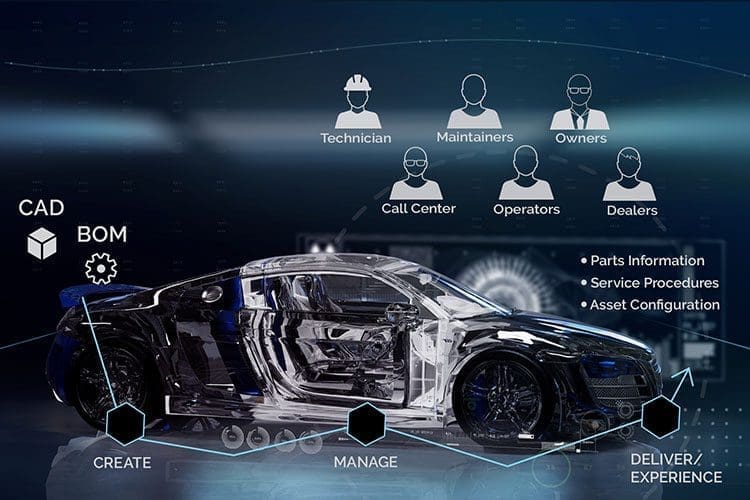
Car rendering with connected digital-thread imagery.
Go deeper: parts catalogs & technical publications
PTC Arbortext service-optimization presentation cover.
Service workflow · PTC recording

Explore the service information journey.

A recorded PTC presentation connecting technical publications with aftermarket parts catalogs. Watch it with your own service workflow in mind.

Engineering connections

Content does more
with product context.

Plan the Windchill and PTC Illustrate connections around your service workflow.

Windchill service information & parts

Manage service documentation and parts catalogs alongside product information. Configured options and variants help define the applicable information set.

Explore Windchill

Complementary products; supported versions, configuration, integration components and licensing define each connection.

What happens after an engineering change?

A connection can help identify related content. Authors and reviewers still assess the change, revise the applicable information, and complete the required approval and publishing process.

Your next step with TriStar

A useful conversation
starts with a small brief.

Bring three starting points. Together, they help frame an evaluation around your team’s work.

  • A representative publication

    One manual or parts catalog, plus examples of topics that are reused.

  • Your required outputs

    The formats, languages and audiences the publication needs to serve.

  • Your working environment

    Current authoring tools, product information systems and content owners.

Explore Arbortext products

Clear answers.
A practical next step.

Choose an authoring and publishing approach around your team, existing documents and product information.

Which licensing model fits our team?

TriStar describes local, machine-bound licensing and shared floating licensing. Confirm availability and terms for your selected products and deployment.

Do we need to convert every Word document at once?

Begin with priority manuals or parts catalogs. Other documents can stay in Word while you introduce structured XML authoring in phases.

How does Arbortext fit with PLM?

Configured Windchill connections relate technical content to product records and engineering changes. Plan the integration and review responsibilities around your publishing process.

How do Editor and Publishing Engine differ?

Editor is the authoring workspace for structured XML. Publishing Engine handles server-based output using configured stylesheets and licensed publishing capabilities.

Your next publishing advantage

Your knowledge.
Ready for its next use.

Ready to explore Arbortext with TriStar?
Let’s discuss a practical first step.

Talk about Arbortext
Start a conversation

What would you
like to publish?

Select a priority to start the conversation.

Choose a priority above.